
Route 53 - Outbound Resolver Endpoints
Dec 20, 2025This is the 2nd part of the 2 part Blog series on Route 53 Resolver Endpoints. It is recommended to go through Part 1 as some points in this article may assume that base knowledge.
Route 53 Outbound Resolver Endpoints also facilitate hybrid DNS resolution capabilities between VPC and On prem networks in the VPC to on prem direction. Lets get started.
Route 53 Outbound Endpoints:
These are opposite of Inbound Endpoints. You can use them to send queries from your VPC workloads to an on prem DNS Server. To set this up you need to create an Outbound Resolver Endpoint and a Resolver Rule.
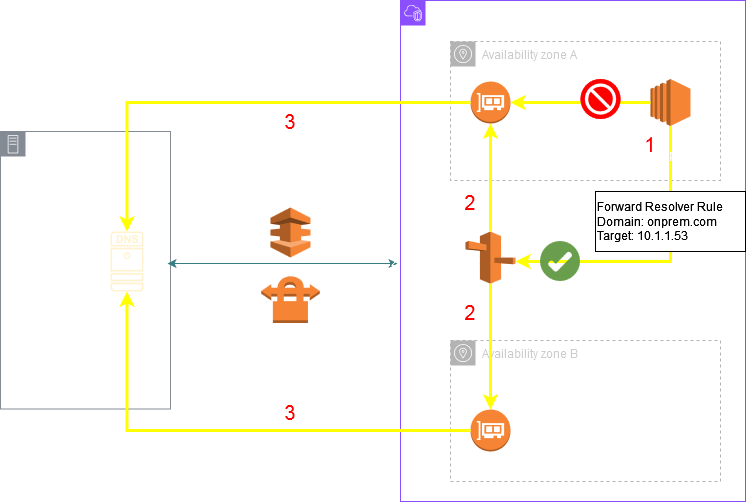
You specify a domain and one or more target DNS server IPs in the Resolver Rule. Whenever a query matches the domain in the rule (or any subdomain) the query is forwarded to the target DNS server IPs specified in the rule using the Endpoints IP addresses as source (The outbound endpoint also creates a minimum of 2 ENIs (AKA RNIs) in your VPC just like Inbound Endpoints)
The key point to remember is that the workloads should first send the query to the VPC DNS Server (.2). You can't send queries to the Outbound Endpoint ENIs directly. They should come via only the VPC DNS Server. If you are using any custom DNS server in your VPC instead of .2 make sure to setup forwarding on that custom server to .2 for the domain in question. The following diagram shows the basic architecture for Outbound Endpoints:
Three types of Resolver Rules:
Forward Rules: If you want to forward queries for a particular domain to a target DNS server you need to create this type of rule. A forwarding rule applies to a domain name and all its subdomains. For example if you create a forward rule for onprem.com then .2 will forward all queries for onprem.com and all its subdomains i.e *.onprem.com to the target DNS servers through the Outbound Endpoint.
System Rules: These can be used to override a Forward rule. From the above example if you wanted to send onprem.com and all its subdomains to the target DNS server except for the subdomain acme.onprem.com then you could create a System Resolver Rule for acme.onprem.com and then .2 will perform the resolution for this subdomain instead of forwarding it to the target DNS server.
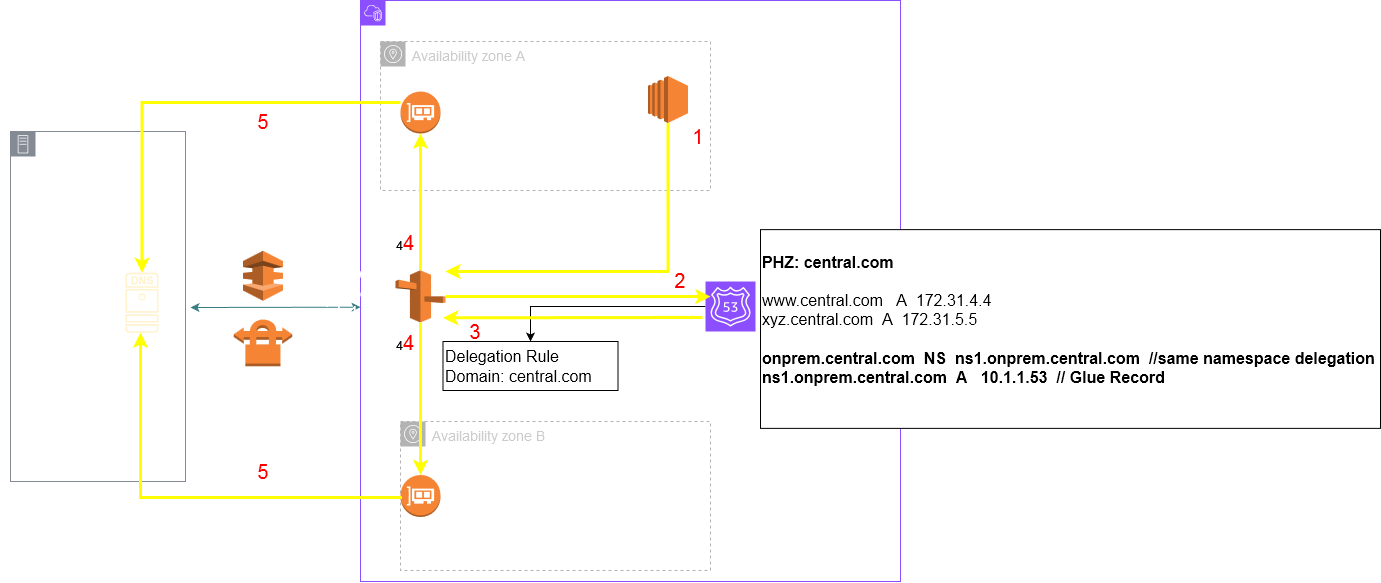
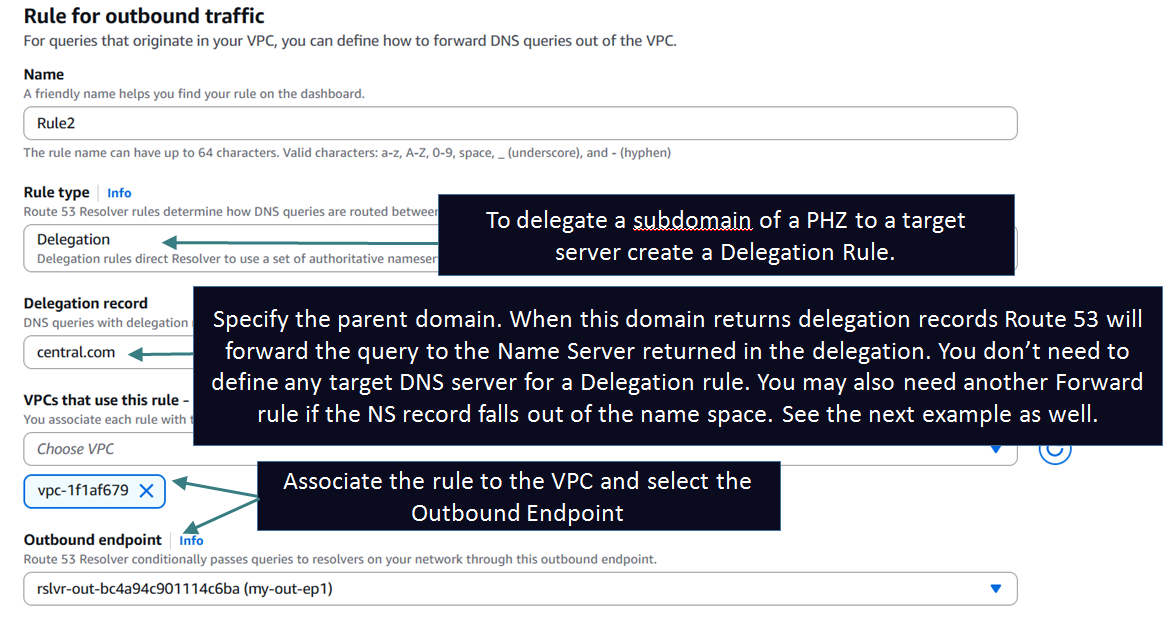
Delegation Rules: These allow you to delegate a subdomain of a PHZ to a target Name Server thus allowing a unified and seamless hybrid DNS architecture. This capability was launched around June 2025. Before this you could not create a subdomain delegation inside a PHZ. I will cover this in the Delegation section later in the article.
Setting up Outbound Endpoint and Forward Resolver Rule to achieve the above architecture:
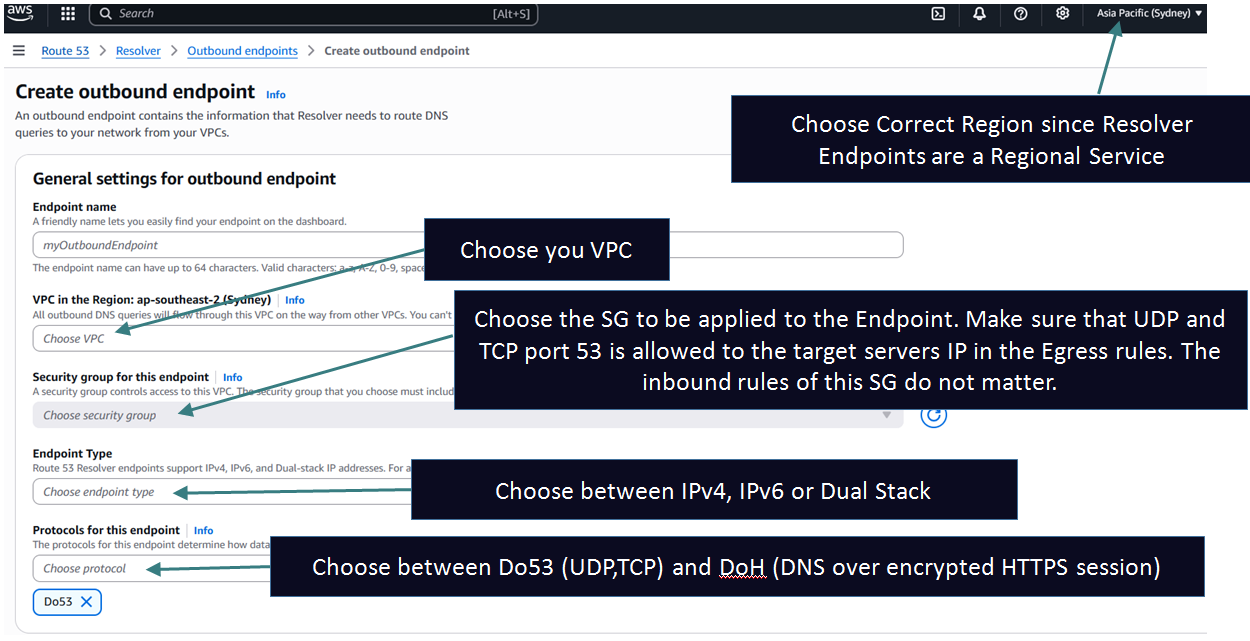
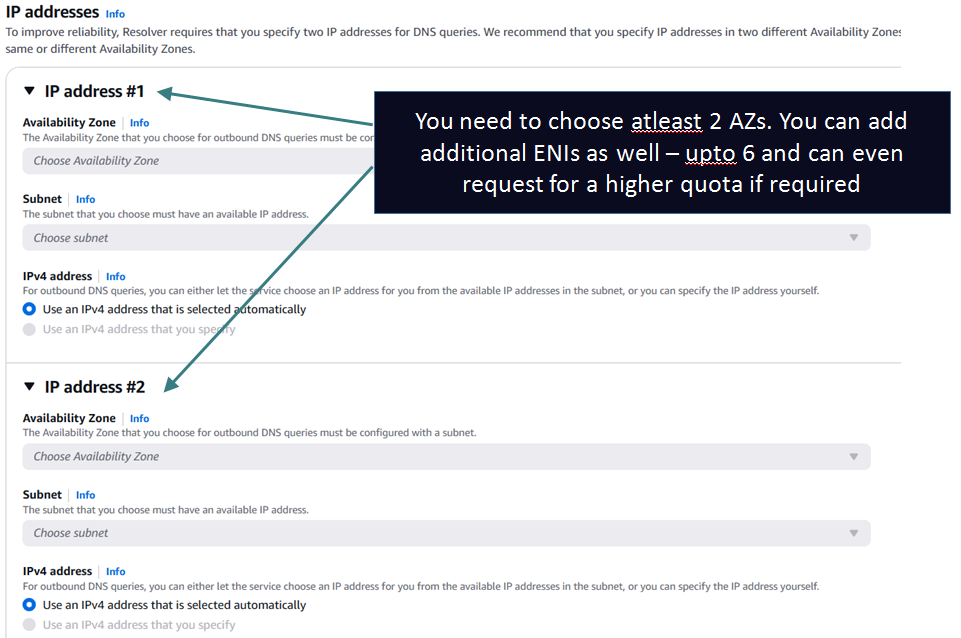
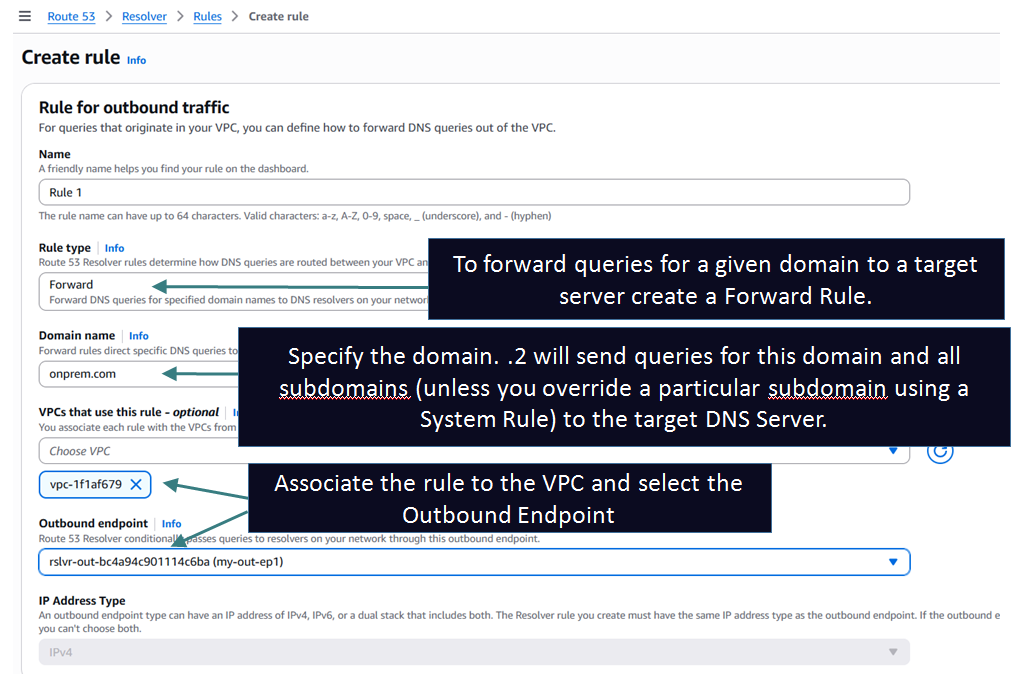
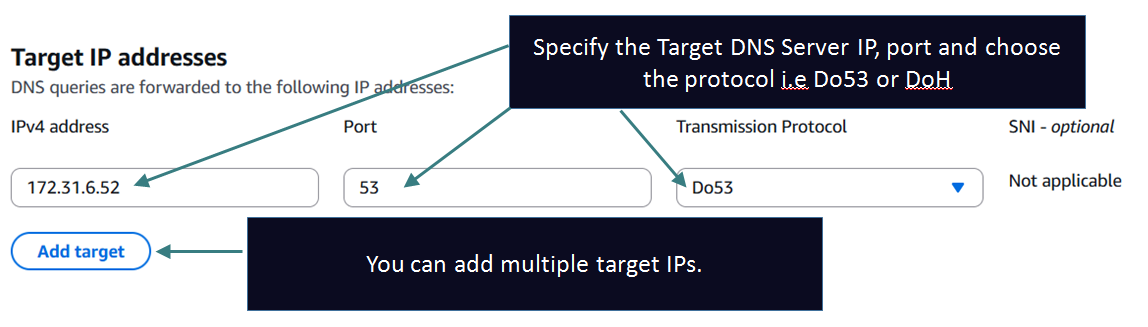
NOTE: In this example I am just pretending an EC2 machine (172.31.6.52) inside my VPC as the target server. In reality the target server can be anywhere: inside the same VPC, on prem, another VPC or even on the Internet. Your routing should be setup such that the Outbound Endpoint subnets should have route towards the target IP.
Here is how I setup my target server: 172.31.6.52 as Authoritative for the domain onprem.com
zone "onprem.com" IN { type master; file "/etc/bind/db.onprem.com"; allow-transfer { none; };};
Zonefile:
$TTL 60; Default time-to-live for records (1 minute)@ IN SOA ns1.onprem.com. admin.onprem.com. ( 2025121101 ; Serial number (YYYYMMDDNN) 10800 ; Refresh (3 hours) 3600 ; Retry (1 hour) 604800 ; Expire (1 week) 3600 ; Minimum TTL (1 hour))@ IN NS ns1.onprem.com. ; NS recordns1 IN A 172.31.6.52 ; Glue record@ IN A 172.31.10.1 ; A record for the root domainwww IN A 172.31.12.1 ;
Query from a machine in the VPC:
[root@ip-172-31-2-118 ec2-user]# dig www.onprem.com

; <<>> DiG 9.18.33 <<>> www.onprem.com
;; global options: +cmd
;; Got answer:
;; ->>HEADER<<- opcode: QUERY, status: NOERROR, id: 5300
;; flags: qr rd ra; QUERY: 1, ANSWER: 1, AUTHORITY: 0, ADDITIONAL: 1

;; OPT PSEUDOSECTION:
; EDNS: version: 0, flags:; udp: 4096
;; QUESTION SECTION:
;www.onprem.com.                        IN      A

;; ANSWER SECTION:
www.onprem.com.         60      IN      A       172.31.12.1

;; Query time: 9 msec
;; SERVER: 172.31.0.2#53(172.31.0.2) (UDP) <--- Note it was sent to the VPC DNS Server (.2)
;; WHEN: Wed Dec 10 16:49:28 UTC 2025
;; MSG SIZE  rcvd: 59
Corresponding Flow Log, Resolver Query Log and pcap from target DNS server:
Note that the query was sent from each RNI to the target DNS server. This is reflected in the VPC Flow logs as well, however the Resolver Query Log logs this as a single query because the client after all just sent 1 query. Its just that the Endpoint ENIs/RNIs send duplicate queries to the target DNS server. I will explain this behavior later in the article.

 {
{"version": "1.100000",
"account_id": "592752082067",
"region": "ap-southeast-2",
"vpc_id": "vpc-1f1af679",
"query_timestamp": "2025-12-10T16:49:28Z",
"query_name": "www.onprem.com.",
"query_type": "A",
"query_class": "IN",
"rcode": "NOERROR",
"answers": [
{
"Rdata": "172.31.12.1",
"Type": "A",
"Class": "IN"
}
],
"srcaddr": "172.31.2.118",
"srcport": "60852",
"transport": "UDP",
"srcids": {
"instance": "i-0d064b7259564c501",
"resolver_endpoint": "rslvr-out-bc4a94c901114c6ba" <---- Shows that the query was sent to the target by .2 using this Outbound Endpoint.
}
}
AutoDefined Rules:
When we talk about Outbound Endpoints and Forward/System Rules we also need to talk about AutoDefined Rules, created automatically by the service, to understand how the VPC DNS Server (.2) handles all queries.
Route 53 creates these rules when you set the enableDnsHostnames flag for a VPC to true. These rules get created even if you aren't using Resolver Endpoints.
Forward AutoDefined Rules:
1. Rules for Private Hosted Zones: For each private hosted zone that you associate with a VPC, a forward rule is created for the domain name and associated with the VPC. The query is forwarded by .2 to the Authoritative Name Servers of the PHZ
2. Rule for various AWS internal domain names: These are those AWS DNS names I was referring to in the Inbound Endpoints article. These are also of type Forward and .2 forwards these queries to the VPCs Authoritative DNS Server which is an internal contruct capable of resolving these domain names.
- <region>.compute.internal - The us-east-1 Region doesn't use this domain name.
- <region>.compute.amazonaws.com or <china region>.compute.amazonaws.com.cn - The us-east-1 Region doesn't use this domain name.
- ec2.internal. Only for us-east-1
- compute-1.internal. Only for us-east-1
- compute-1.amazonaws.com. Only for us-east-1
- localhost
- localdomain
- Similar rules for the other region if your connect your VPC to a VPC from another region using Transit Gateway or VPC Peering with DNS Support property enabled
3. A rule for all other domains: VPC Resolver creates a "." (dot) rule that applies to all domain names for which there is no Forward/System or AutoDefined Rule. The "." rule has a type of Recursive, which means that the rule causes VPC DNS Server to act as a recursive resolver.
Reverse AutoDefined Rules:
- 10.in-addr.arpa
- 16.172.in-addr.arpa through 31.172.in-addr.arpa
- 168.192.in-addr.arpa
- 254.169.254.169.in-addr.arpa
- Rules for each of the CIDR ranges of the VPC and also any VPC connected via Transit Gateway or VPC Peering. For example, for a VPC that has a CIDR range of 10.0.0.0/23, the following rules are created:
- 0.0.10.in-addr.arpa
- 1.0.10.in-addr.arpa
- 127.in-addr.arpa
- 1.0.0.0.0.0.0.0.0.0.0.0.0.0.0.0.0.0.0.0.0.0.0.0.0.0.0.0.0.0.0.0.ip6.arpa
- 0.0.0.0.0.0.0.0.0.0.0.0.0.0.0.0.0.0.0.0.0.0.0.0.0.0.0.0.0.0.0.0.ip6.arpa
Overriding AutoDefined Rules:
If you want to forward queries for forward-lookup domains for which AutoDefined Rules are created to your on prem DNS server you can do the following things:
1. Create a Forward a rule for that domain and point it to the on prem target DNS Servers. Keep in ind that if there is a more specific rule it will be preferred. For example if you create a forward rule for the "." domain to override the "." AutoDefined rule it will work for all domains for which there are no other more specific rules such as the autodefined ones describe above. Hence if you want to send those domain as wel for example <region>.compute.internal then create a forward rule explicitly for this domain and point it to your target servers.
2. You can also create a forward rule for "." and set the enableDnsHostnames VPC attribute to false which means that no autodefined rules will be created and the "." rule will forward ALL queries from your VPC to your on prem network. Keep in mind that this is not recommended since the amazonaws.com related DNS queries may stop working and cause some features to stop working in your environment.
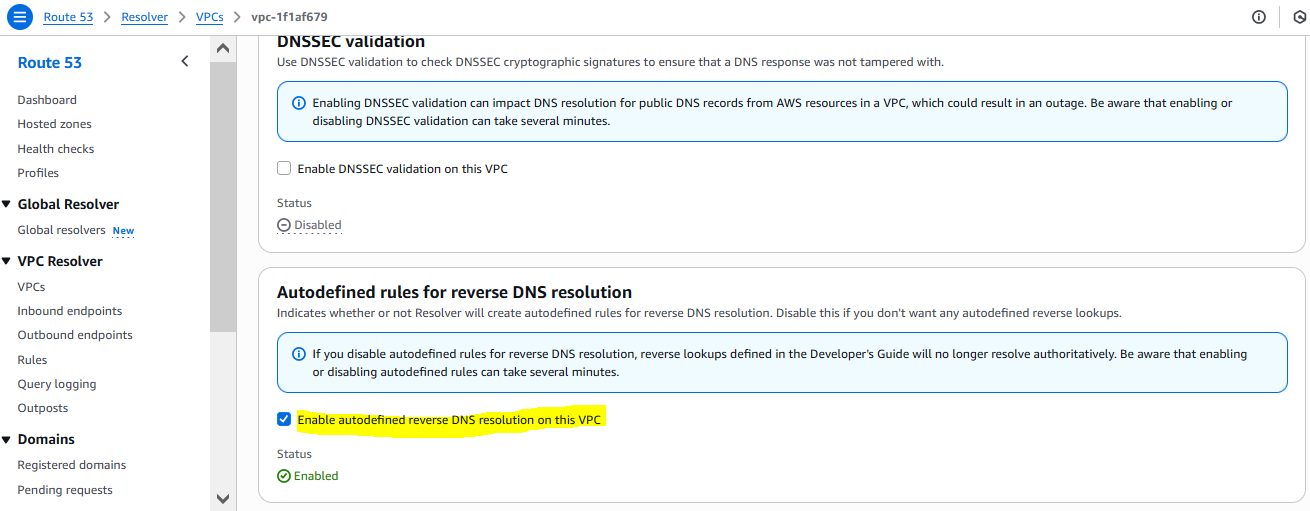
For reverse-lookup domains you can take similar approach as above. But for reverse-lookup zones there is another option. You can disable the creation of reverse lookup autodefined zones from the Resolver console. Click on VPCs under VPC Resolver section from the left hand side menu of the Route 53 console --> Click on the VPC in question --> Scroll down and you will see the below option - Clear the check box
Delegation Support on Outbound Endpoints:
Before June 2025, Outbound Endpoints only supported recursive queries/forwarding.
This means that you could not delegate a subdomain of a PHZ to an onprem DNS server in your environment. But with this feature release you can now achieve this with the help of a Delegation rule. Consider this architecture:
Setting up the Delegation Rule:
My PHZ:
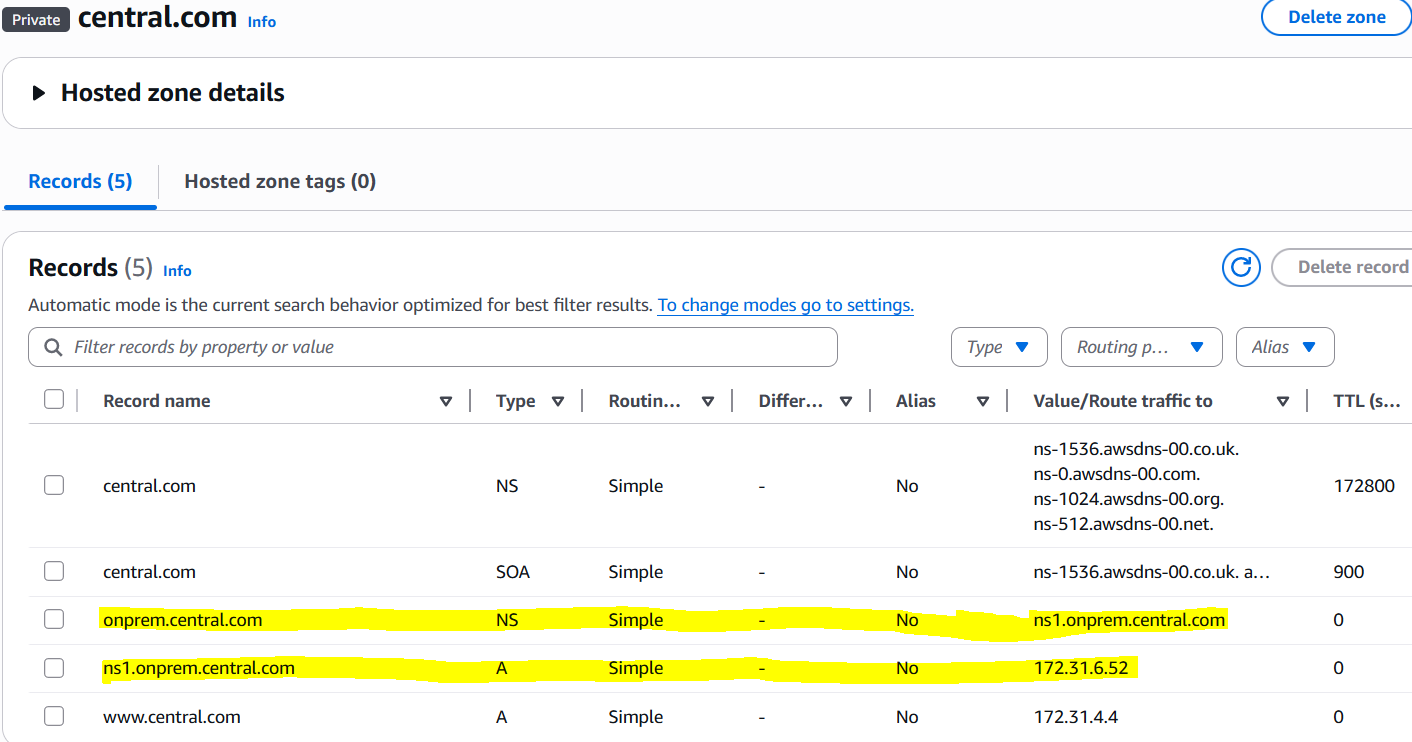
I then set an Authoritiative Zone for onprem.central.com on my custom BIND server 172.31.6.52.
Successful Query from EC2 machine in the VPC:
[root@ip-172-31-2-118 ec2-user]# dig t1.onprem.central.com; <<>> DiG 9.18.33 <<>> t1.onprem.central.com;; global options: +cmd;; Got answer:;; ->>HEADER<<- opcode: QUERY, status: NOERROR, id: 48723;; flags: qr rd ra; QUERY: 1, ANSWER: 1, AUTHORITY: 0, ADDITIONAL: 1;; OPT PSEUDOSECTION:; EDNS: version: 0, flags:; udp: 4096;; QUESTION SECTION:;t1.onprem.central.com. IN A;; ANSWER SECTION:t1.onprem.central.com. 60 IN A 172.31.99.99;; Query time: 9 msec;; SERVER: 172.31.0.2#53(172.31.0.2) (UDP);; WHEN: Wed Dec 10 18:40:32 UTC 2025;; MSG SIZE rcvd: 66
pcap from the target server: 172.31.6.52

"version": "1.100000",
"account_id": "592752082067",
"region": "ap-southeast-2",
"vpc_id": "vpc-1f1af679",
"query_timestamp": "2025-12-10T18:40:32Z",
"query_name": "t1.onprem.central.com.",
"query_type": "A",
"query_class": "IN",
"rcode": "NOERROR",
"answers": [
{
"Rdata": "172.31.99.99",
"Type": "A",
"Class": "IN"
}
],
"srcaddr": "172.31.2.118",
"srcport": "47194",
"transport": "UDP",
"srcids": {
"instance": "i-0d064b7259564c501"
}
}
In case if your delegated Name Server name falls out of the namespace for example: ns1.onprem.central.net (Also note the absence of Glue record).
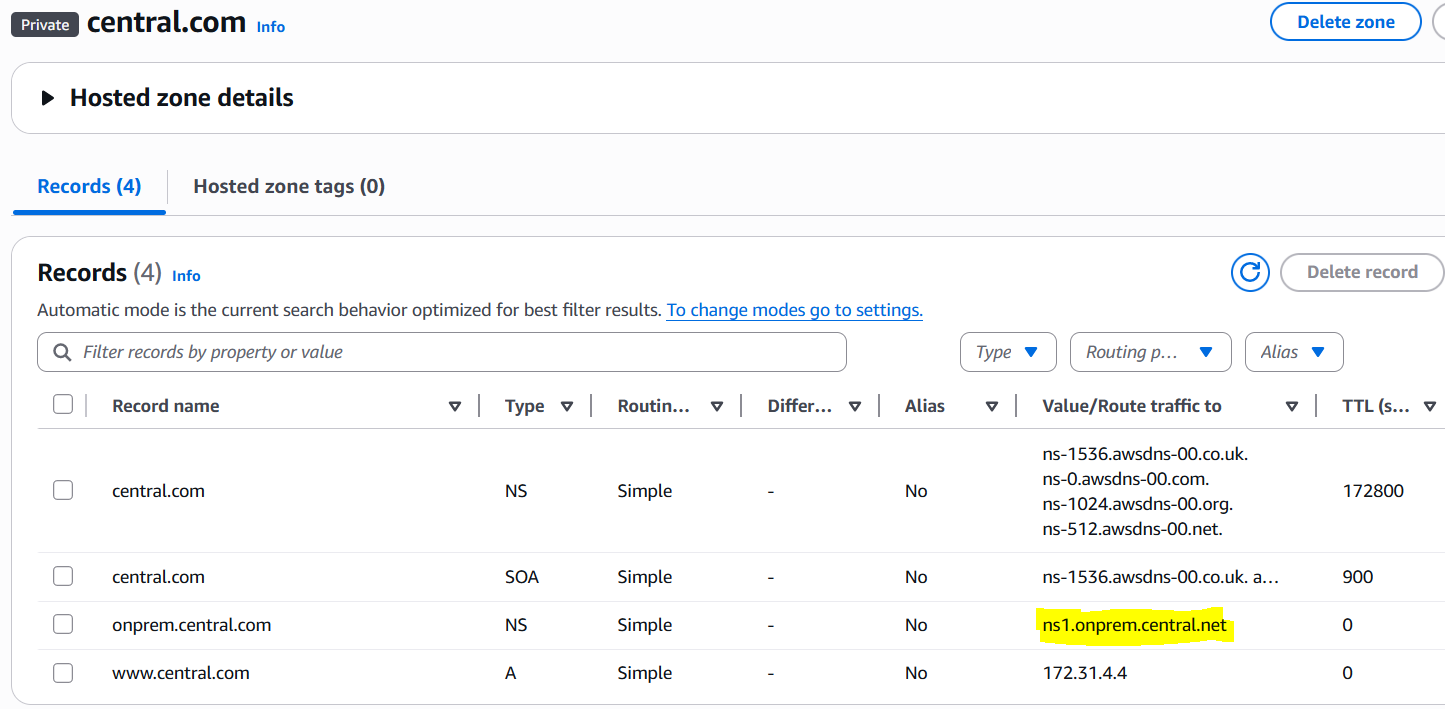
Then you need to add to create Resolver rules like this:
1. Create a Forward rule for onprem.central.net and set the target IP to whatever is the IP of that target server.
2. Create a Delegation rule for onprem.central.net.
Sharing Outbound Endpoint/Resolver Rules:
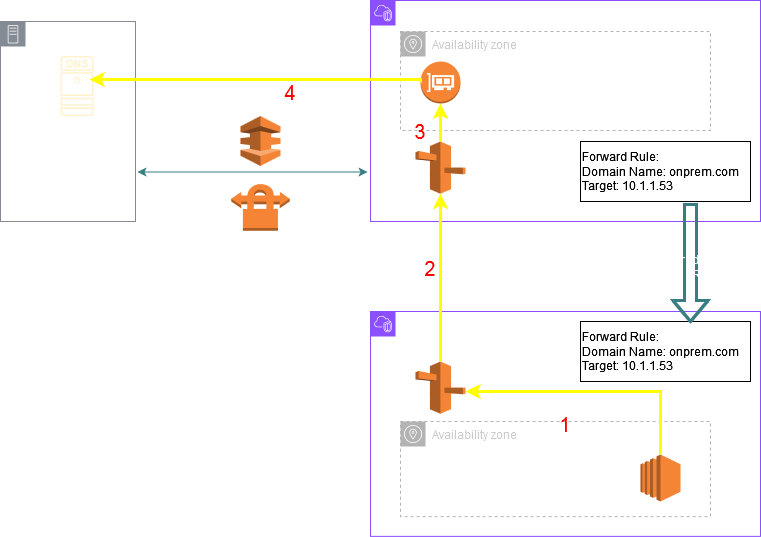
Resolver Rules are kind of expensive: ~$180 per month (assuming 2 ENIs). You can create just 1 outbound endpoint per region in let's say a central VPC of the region and then share the outbound endpoint with other VPCs in the same region in the same or different accounts.
For other VPCs in the same account it is quite simple: Just associate the Resolver Rule with the other VPC. However for VPCs in other AWS Accounts you will first need to share the Resolver Rule using Resource Access Manager (RAM). Once the rule appears in the other Account go ahead and associate the rule to the desired VPC.
A key thing to understand is that there is no connectivity required between the VPC where the Outbound Endpoint has been deployed and the other VPCs to which the Resolver Rule has been shared. The other VPCs leverage the Outbound Endpoint of the central VPC to forward the queries to the on prem target servers. Once the workloads in the other VPCs send their queries to their local VPC DNS server the queries are internally transported to the VPC DNS Server of the central VPC and then forwarded to the on prem target server through the Outbound Endpoint ENIs. The following diagram shows this architecture:
Other commonly used architectures:
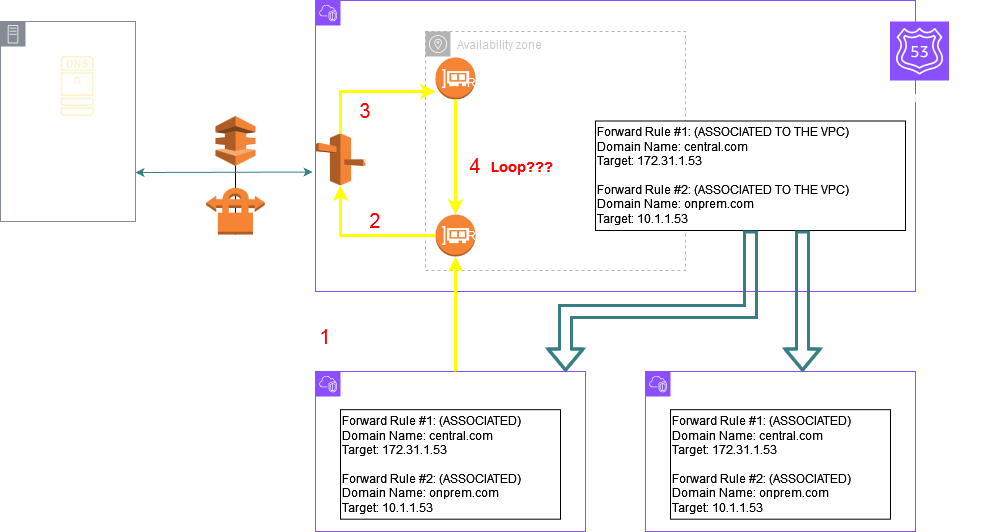
This architecture is commonly used to bring queries for a particular domain from all your spoke VPCs to a central VPC which is perhaps connected to a PHZ and you can't associate this PHZ to your spoke VPCs because of some compliance reasons.
The goal is that all the spoke VPCs should be able to resolve DNS records in the PHZ associated only to the central VPC.
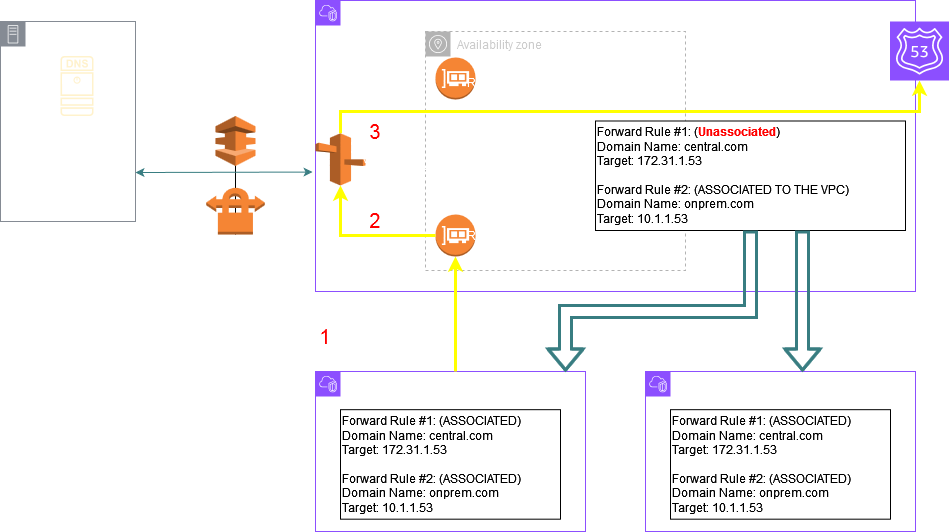
So an Inbound Endpoint is created in the central VPC where the PHZ is associated. Next an Outbound Endpoint and Resolver Rule is created for the domain of the PHZ. Note that the target IPs for this rule are the Inbound Endpoint IPs. This rule is shared with the other spoke VPCs.
Now in the below diagram there is a configuration mistake which will lead to a DNS query loop causing the queries from the spoke VPCs for central.com to SERVFAIL.
The mistake is associating this rule with the central VPC. As a thumb rule if the target of a rule is the same VPCs Inbound Endpoint IP you should not associate the rule to the same VPC. The purpose of this rule is to bring the queries from the other VPCs to the central VPC. This rule once shared to the other spoke VPCs should be associated to those spoke VPCs but it should be left unassociated to the central VPC otherwise it will cause a loop as depicted in the below picture Step 4 where the query is again forwarded from the Outbound Endpoint to the Inbound Endpoints IP following the Resolver Rule.
If left associated like in the picture below, after the Inbound Endpoint forwards the query to .2, .2 will match the rule for the PHZ and the query will succeed.
Considerations:
1. Public Target IP:
The Outbound Endpoint ENIs get private IPs from your VPC CIDR range. If the target IPs of a Resolver Rule are public IPs on the Internet you need to create a route in that Endpoint subnets Route Table pointing to a NAT Gateway so that the ENI can reach the target.
2. CNAME considerations:
Consider this scenario: Resolver rule for onprem.com to target on prem server IP. EC2 sends a query for www.onprem.com. This is a CNAME record on the target server like this:
www.onprem.com CNAME www.xyz.com
When this response is received by the .2 server through the Outbound Endpoint it will try to resolve www.xyz.com. If there is no PHZ or Resolver Rule for this domain then the "." rule will match and .2 will act as a Recursive Resolver and try to resolve this domain on the Internet. If your intention is to send this query also to an onprem target server then create another Resolver Rule for xyz.com as well.
3. EDNS considerations:
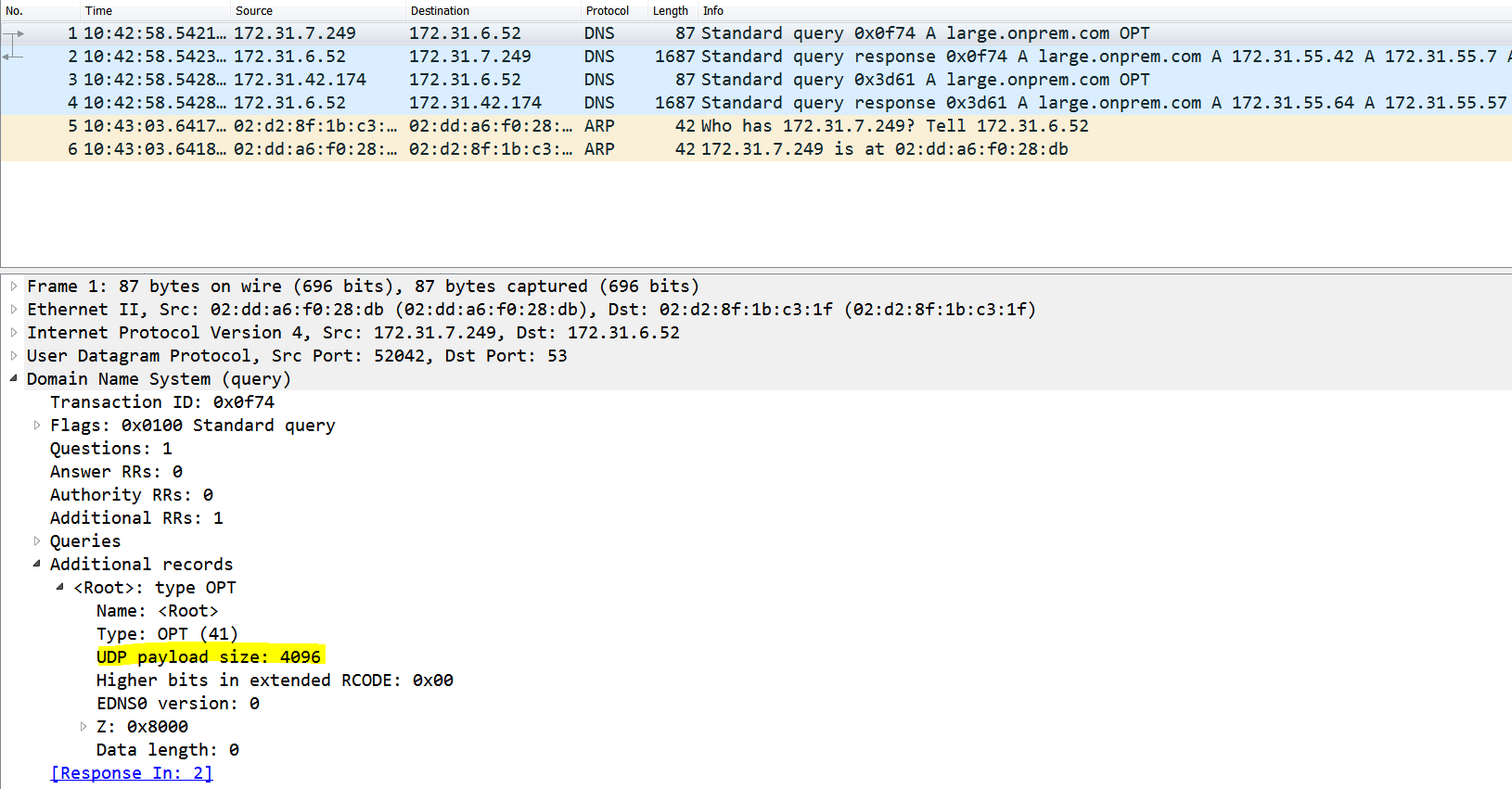
As of this writing the edns-udp-size of Outbound Endpoints is 4096. (These is a BIND directive - I am not suggesting AWS is using BIND - I just mean equivalent of this option). This means for an onprem target server which supports a max udp size of 4096, the max UDP response size can be as large as 4096 bytes. If the connectivity between on prem and AWS has a lower MTU it can lead to fragmentation of larger than MTU UDP responses and some firewalls (maybe there is one on the onprem side ) are known to drop UDP fragments.
Now if the reply from the target server is larger than the max udp size of the server then the reply from the server will be truncated and the Outbound Endpoint will retry over TCP and this can fail is MSS is not setup correctly.
Querying Outbound Endpoint for large record:
[root@ip-172-31-2-118 bin]# dig large.onprem.com +qr
; <<>> DiG 9.18.33 <<>> large.onprem.com +qr
;; global options: +cmd
;; Sending:
;; ->>HEADER<<- opcode: QUERY, status: NOERROR, id: 44737
;; flags: rd ad; QUERY: 1, ANSWER: 0, AUTHORITY: 0, ADDITIONAL: 1
;; OPT PSEUDOSECTION:
; EDNS: version: 0, flags:; udp: 1232 <--- Client advertises a 1232 buffer size only.
; COOKIE: b8f5b3d937059c57
;; QUESTION SECTION:
;large.onprem.com. IN A
;; QUERY SIZE: 57
;; Truncated, retrying in TCP mode. <--- Since the response size is larger .2 sends a Truncated response (tc bit set)
;; Sending:
;; ->>HEADER<<- opcode: QUERY, status: NOERROR, id: 10347
;; flags: rd ad; QUERY: 1, ANSWER: 0, AUTHORITY: 0, ADDITIONAL: 1
;; OPT PSEUDOSECTION:
; EDNS: version: 0, flags:; udp: 1232
; COOKIE: b8f5b3d937059c57
;; QUESTION SECTION:
;large.onprem.com. IN A
;; QUERY SIZE: 57
;; Got answer:
;; ->>HEADER<<- opcode: QUERY, status: NOERROR, id: 10347
;; flags: qr rd ra; QUERY: 1, ANSWER: 100, AUTHORITY: 0, ADDITIONAL: 1
;; OPT PSEUDOSECTION:
; EDNS: version: 0, flags:; udp: 4096 <--- .2's max-udp-size
;; QUESTION SECTION:
;large.onprem.com. IN A
;; ANSWER SECTION:
large.onprem.com. 60 IN A 172.31.55.18
large.onprem.com. 60 IN A 172.31.55.19
large.onprem.com. 60 IN A 172.31.55.20.........(discarding the remaining records for brevity)
;; Query time: 0 msec
;; SERVER: 172.31.0.2#53(172.31.0.2) (TCP) <--- Response received over TCP
;; WHEN: Thu Dec 11 10:42:58 UTC 2025
;; MSG SIZE rcvd: 1645 <--- Response size
Packet capture taken on target server shows that Outbound Endpoint IPs advertised a 4096 edns-udp- size and since I have set the target server with a max-udp-size of 4096 this large response was transferred over UDP between the target server and the Outbound Endpoints. This shows the per hop nature of ENDS kind of similar to per hop headers in HTTP like "Connection".
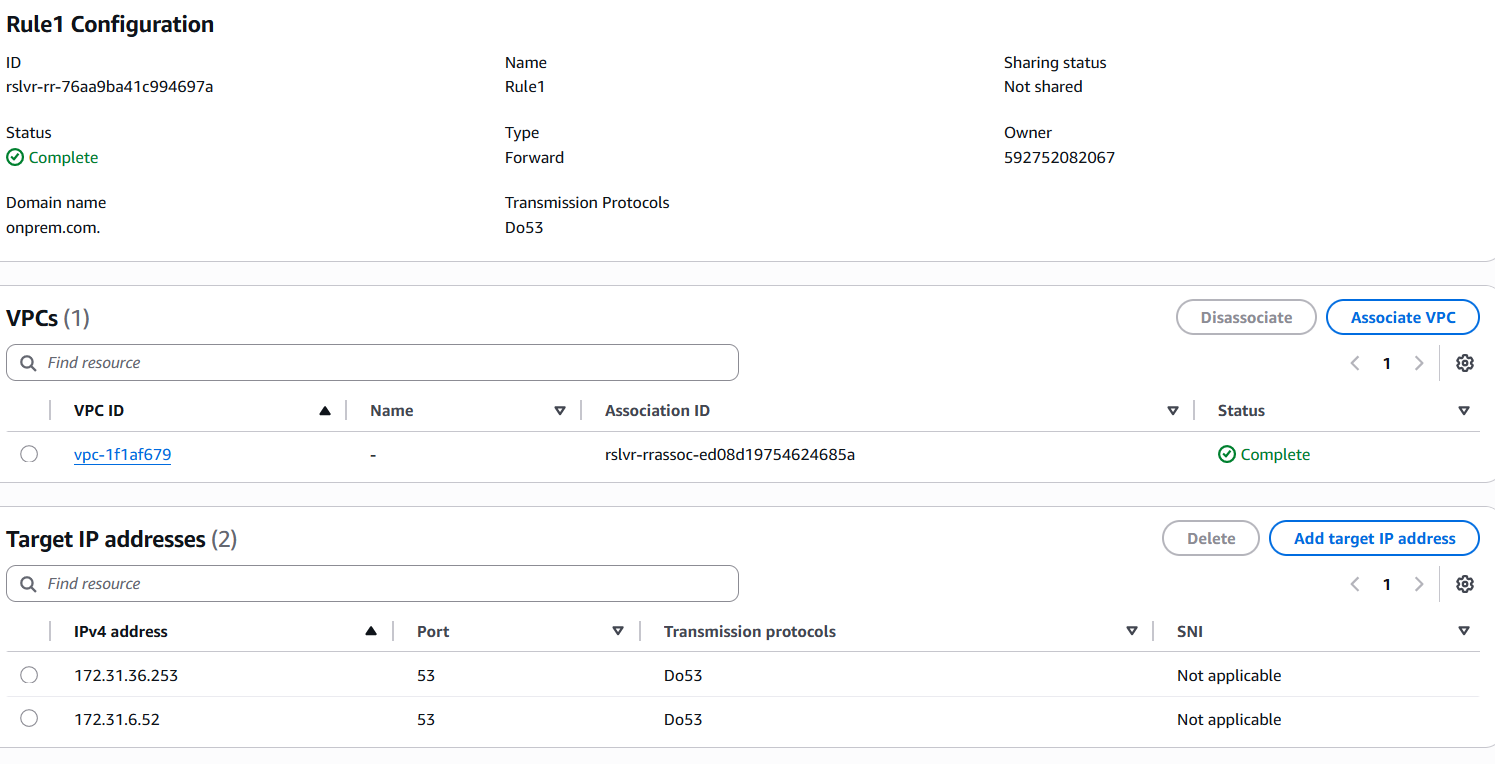
4. Outbound Endpoints retry + timeout behavior: The Outbound Endpoint randomly chooses an ENI and a target IP (if several target IPs are defined) to forward the query. If a target IP does not respond the query is retried to another random target IP. Make sure that all the target IP addresses are reachable from all the ENIs. If the Endpoint is not able to forward queries to any of the target IP, it can lead to extended DNS resolution times as the previous query will timeout before a new query is sent.
In this test I added another Authoritative target server for the onprem.com domain inside my VPC: 172.31.36.253:
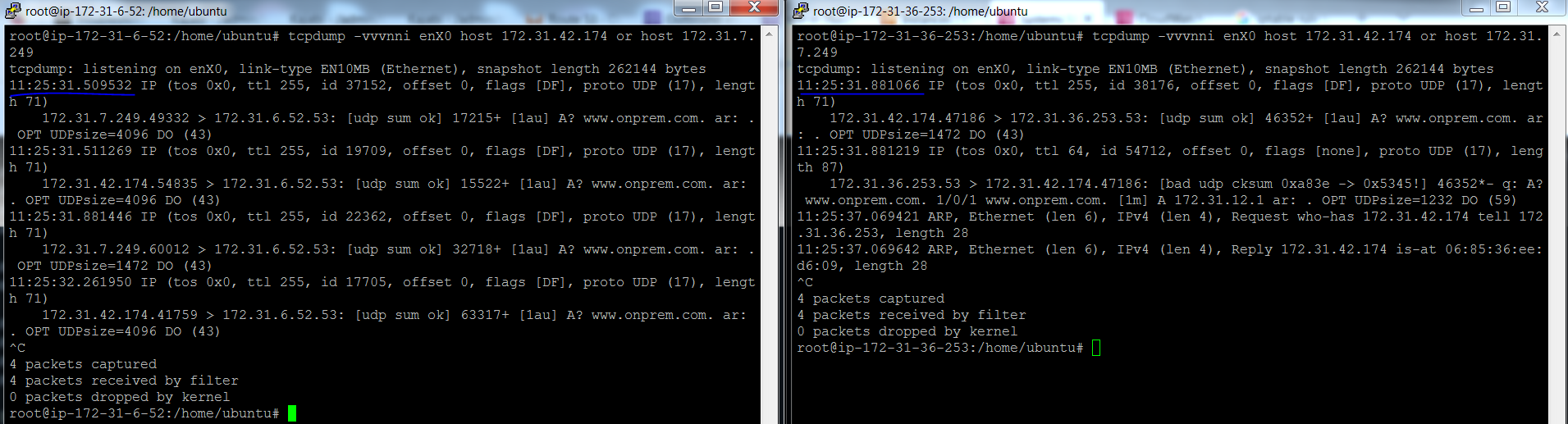
And then I added an iptable rule on the original target server 172.31.6.52 to block udp 53 packets.
Here is a query from a client machine in the VPC:
[root@ip-172-31-2-118 bin]# dig www.onprem.com; <<>> DiG 9.18.33 <<>> www.onprem.com;; global options: +cmd;; Got answer:;; ->>HEADER<<- opcode: QUERY, status: NOERROR, id: 48489;; flags: qr rd ra; QUERY: 1, ANSWER: 1, AUTHORITY: 0, ADDITIONAL: 1;; OPT PSEUDOSECTION:; EDNS: version: 0, flags:; udp: 4096;; QUESTION SECTION:;www.onprem.com. IN A;; ANSWER SECTION:www.onprem.com. 60 IN A 172.31.12.1;; Query time: 379 msec <--- Elevated response time. This can be higher as well. Depends on how many Endpoint ENIs, how many target servers which are not responding, base latency to the target servers etc.;; SERVER: 172.31.0.2#53(172.31.0.2) (UDP);; WHEN: Thu Dec 11 11:25:31 UTC 2025;; MSG SIZE rcvd: 59
Packet capture from both target servers below. The one on the left shows that the queries kept coming in and there was no reply (thanks to our Iptable rule). Note the timestamp of the 1st query received by the old server: 11:25:31.509532. This query was not answered and hence the query was retried to both the servers. The new server on the right received its 1st query at 11:25:31.881066 which is after 372 milliseconds and this delay is reflected in the DIG output.
5. Stale Caching: The VPC DNS Server (.2) can return a response from an expired cache if it does not receive a reply from the upstream DNS server (not limited to target DNS server of a Resolver Rule - this applies to any upstream DNS server like Authoritative Name Servers on the Internet as well)
Troubleshooting Tips:
1. Check your Outbound Resolver Endpoint health status: In case of Outbound Endpoints the Auto Recovering status can be due to high query volume or because of targets servers not responding or responding slowly or erratically. Similar troubleshooting is required.
2. Check Query Volume and Capacity: Again similar to Inbound Endpoints use the CloudWatch metrics:
- OutboundQueryVolume
- OutboundQueryAggregateVolume: This one is new and it shows query volumes from all VPCs where the rule is shared.
- ResolverEndpointCapacityStatus
3. Query the target DNS Server(s) directly from the subnets where the Outbound Endpoint is deployed bypassing .2 and the Outbound Endpoint and pay close attention to the status code especially in the dig output (NOERROR/NXDOMAIN/SERVFAIL/REFUSED). This is assuming that the target server allows the new source IP.
dig <domain> @<target ip>
nslookup <domain> <target ip>
NEED TO ADD SOMEHTING FOR REFUSED/SERVFAIL AND TEST SERVFAIL VS TIMEOUT
- If the query times out instead it indicates there are connectivity issues. When querying through .2 and the Outbound Endpoint cannot reach the target IPs or receives a REFUSED status code from the target servers it will appear as a SERVFAIL to the client.
- Check egress Security Group rules of your Outbound Endpoint. The ingress rules don't matter
- Check egress NACL rules on the subnets of the Outbound Endpoint
- Check routing and connectivity - VPN/Direct Connect/TGW configuration
- You can check VPC Flow Logs of the Outbound endpoint ENIs. Keep in mind that only the query from Outbound Endpoint ENI to target IP will show in the VPC Flow Logs. The part where .2 forwards the query to the Endpoint ENI is not captured in VPC Flow Logs.
- Make sure any intermediate Firewalls and the target server allow IPs from the Outbound Endpoint ENIs.
- You also have the option of turning on Resolver Query Logging which logs every query received by .2
- If you get a unexpected response or status code in the dig output check if you have overlapping configuration:
- Most specific PHZ/Resolver Rule wins. Check if a PHZ is associated to your VPC from another account (Remember these don't show on the console)
- If PHZ and Resolver Rule overlap then Resolver Rule wins.
- Make sure that the Resolver Rule (local or shared) is associated to the intended VPC.
- Check for any more specific Resolver Rules or System rules.
- Check if a Route 53 profile is applied to the VPC and then check what resources it applies to your VPC
Conclusion:
This brings us to the end of the story on Route53 Resolver Endpoints. As you can see there are a lot of considerations and more planning required to implement Outbound Endpoints as compared to Inbound Endpoints. I hope this article helps by bringing everything together to speed up things.
Thank you for reading!