Route 53 Global Resolver
Dec 13, 2025AWS Route 53 launched a new feature on 30th Nov. 2025 called Global Resolver.
It is an Internet reachable Resolver service capable of resolving public domains (much like Cloudfare's 1.1.1.1 or Google's 8.8.8.8) and domains configured in your Route 53 Private Hosted Zones.
It runs completely outside your VPC environment. With this release it becomes easier for customers to access Route53 Private Hosted Zones from any on prem location without having to worry about creating connectivity (VPN/Direct Connect) to their VPCs and setting up Route 53 Inbound Resolver Endpoints. Apart from this it can act as a normal recursive resolver capable of resolving any public domain on the Internet.
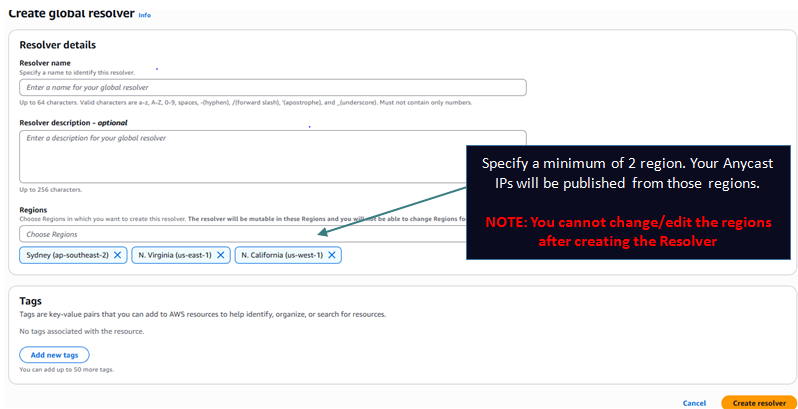
When you create a Global Resolver you specify a minimum of 2 AWS regions. The service deploys 2 Anycast public IPs which start getting advertised from all the regions you specify. Anycast routing on the Internet ensures to take a customer to the nearest region. If a region becomes unavailable the routing takes the customer to the next nearest region and so on providing lowest possible latency and redundancy.
Step 1: Create the Global Resolver:
Step 2: Create Views:
Next you need to define Views to define who can access those 2 Anycast IPs which get created as part of the previous step. You can define multiple views for different set of clients IPs. While creating a View you define the following settings:
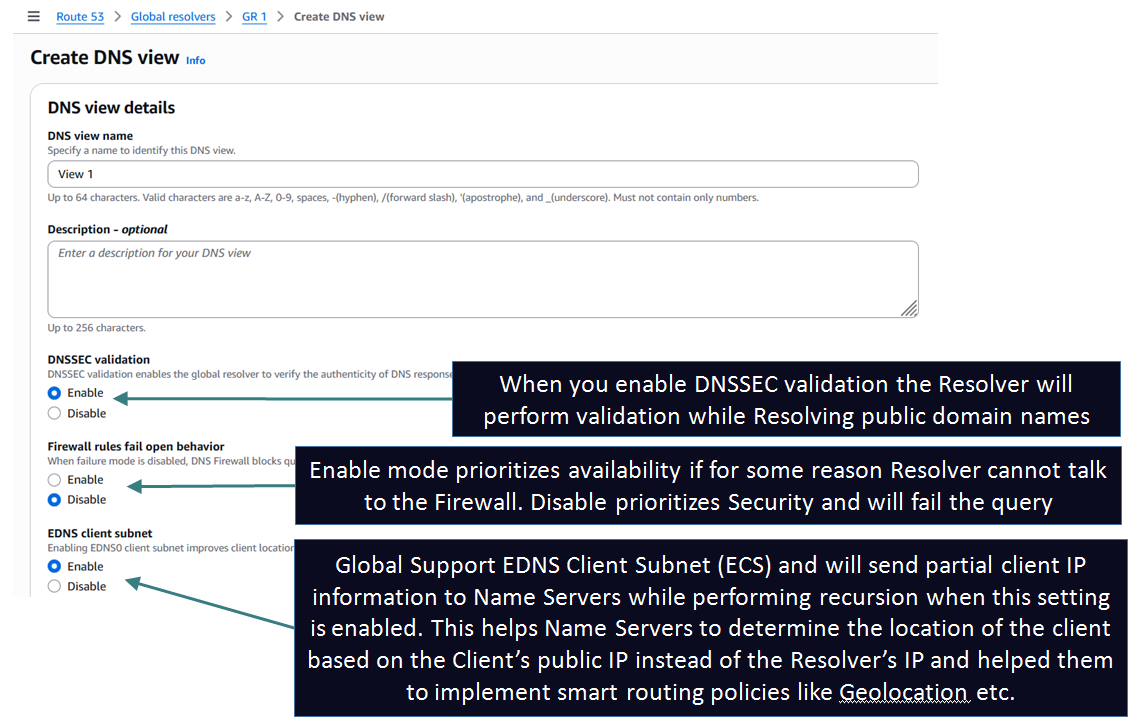
Step 3: Configure the settings for every View to define how clients match against the View and how their queries are handled by the Global Resolver:
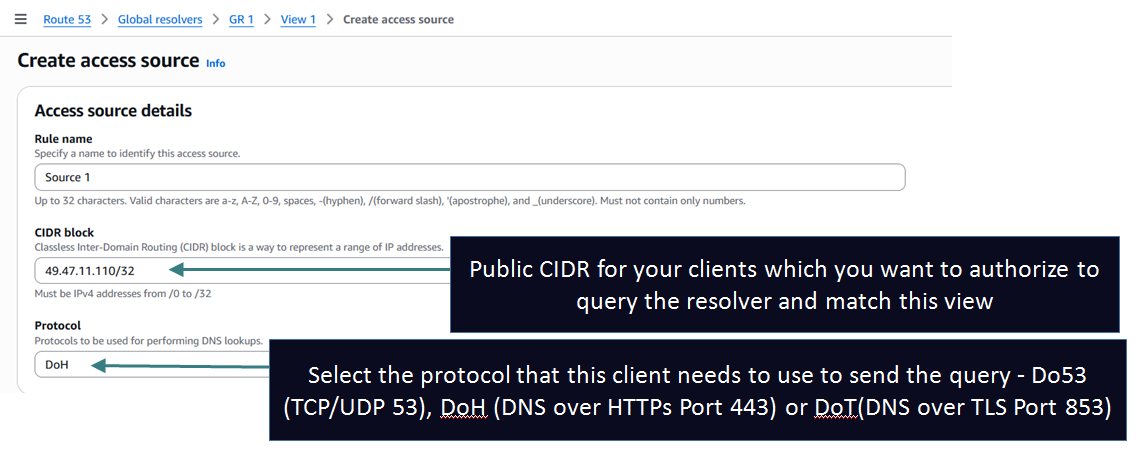
1. Access Sources or Access Tokens: The most important setting which defines which clients match this view. You have 2 options:
- Access Sources: Add the public IP ranges (CIDRs) of your clients and protocol: Do53 (TCP/UDP 53), DoH (DNS over HTTPs Port 443) or DoT(DNS over TLS Port 853). Suitable for clients with fixed IPs like a branch/DC network. You can add multiple CIDRs.
- Access Tokens: If the IPs of your clients are not fixed such as Mobile Clients you can define Tokens which can be used to Authorize clients. This method only works for DoH and DoT protocol. While making the query using DOH or DOT the client needs to supply the token as a query string and if the token matches they get access to the View. The match is purely based on token and not on IP (they can come in from any IP).
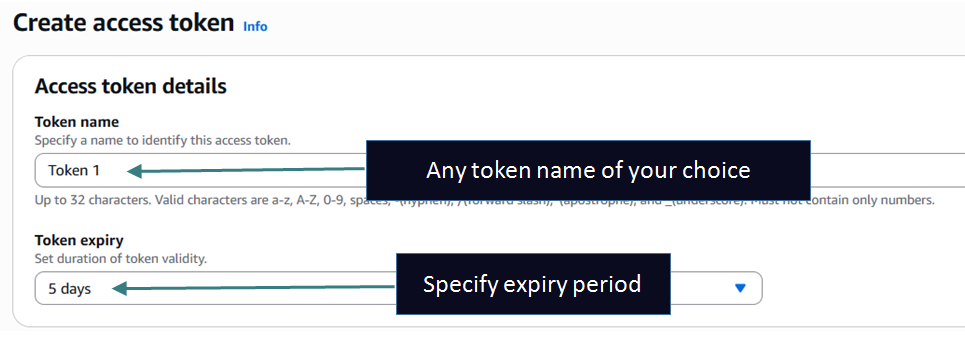
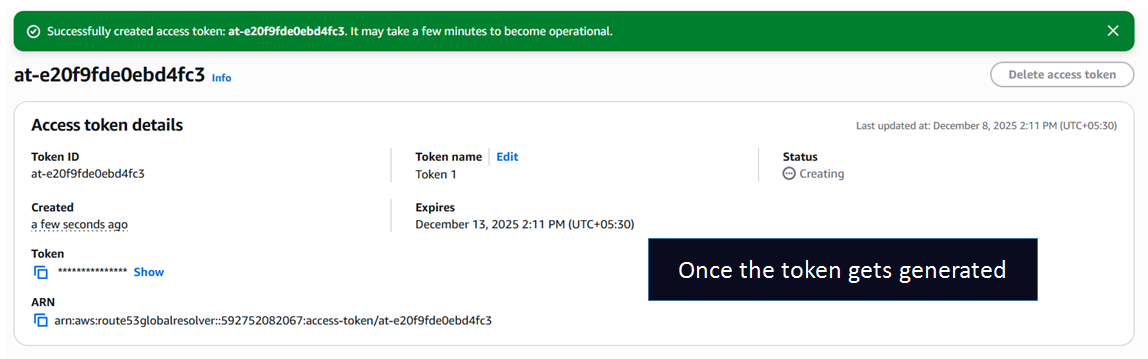
NOTE 1: For Access Source, the client matches the view with the most specific matching IP range in case you have defined overlapping CIDRs across Views.
NOTE 2: If the client IP does not match any Access Source rules across your Views and the client also does not present any Access Token defined in any of the Views then the client request is denied and will appear as query timed out.
2. [Optional] DNS Firewall Rules for providing domain filtering and advanced security:
Global Resolver integrates with Route 53 DNS Firewall service to provide filtering capability to enhance the security posture of the service. You can write your own custom domain lists to block certain domains or leverage built in Managed domain lists to block domains.
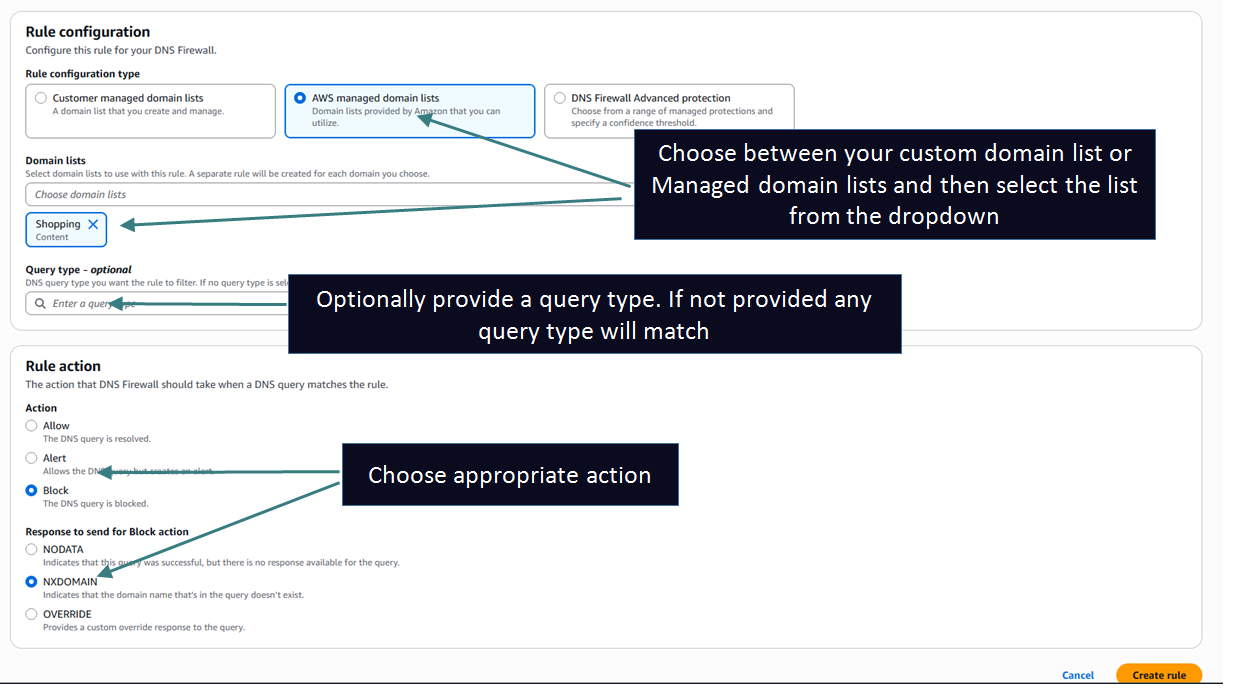
You can also create a rule which leverages advanced threat protection like DNS tunneling detection to prevent DNS exfiltration and Domain generation algorithms (DGAs) to prevent attackers from generating a large number of domains to launch malware attacks like below:
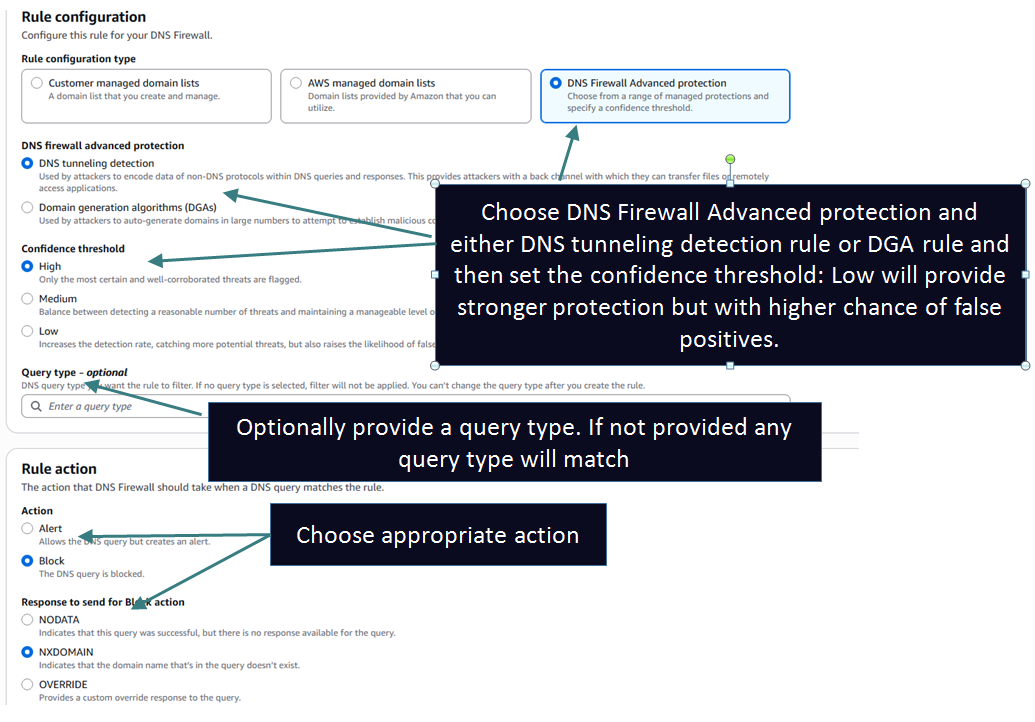
NOTE 1: When leveraging built in domain lists or advanced threat detection rules you may run into false positives. If you want to allow those domains you can add a new rule with higher priority referencing a custom domain list with the domain in question and setting the action to ALLOW.
NOTE 2: If you have any custom domain lists or rules/rulegroups created in the DNS Firewall Service, they don't show up in the Global Resolver service. You need to write completely separate domain lists and rules but the format is the same as the DNS Firewall service - so nothing new here if you already know how to work with DNS Firewall Service
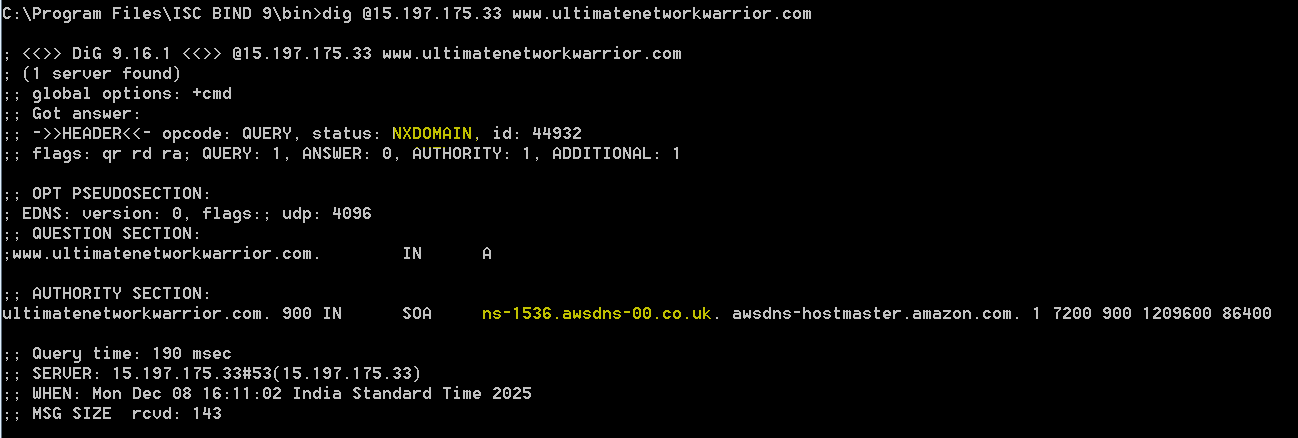
3. [Optional] Private Hosted Zones (PHZs): You can associate 1 or more PHZs to your View. If the query matches any PHZ the answer comes from the PHZ. If the query matches the PHZ namespace but there is no record in the PHZ the client will get a NXDOMAIN. The resolution will not fallback to a public hosted zone for the same domain if any exist.
If you don't associate any PHZs to the view then the view will only act as a recursive resolver and query public Name Servers to resolve any received query.
These PHZ may be associated to 1 or more VPCs. Those VPCs will continue to get access to the PHZ and now the clients using the Global Resolver and matching the view where the PHZ was associated will also get access to the PHZ. When creating a new PHZ using the console you still have to specify atleast 1 VPC to attach to the PHZ but you can now use the CreateHostedZone API to skip associating the PHZ to a VPC if you only want to associate it to a View.
Step 4: [OPTIONAL] Configure Logging:
You can send Global Resolver Logs to CloudWatch, S3 (same or different account) or Data Firehose (same or different account).
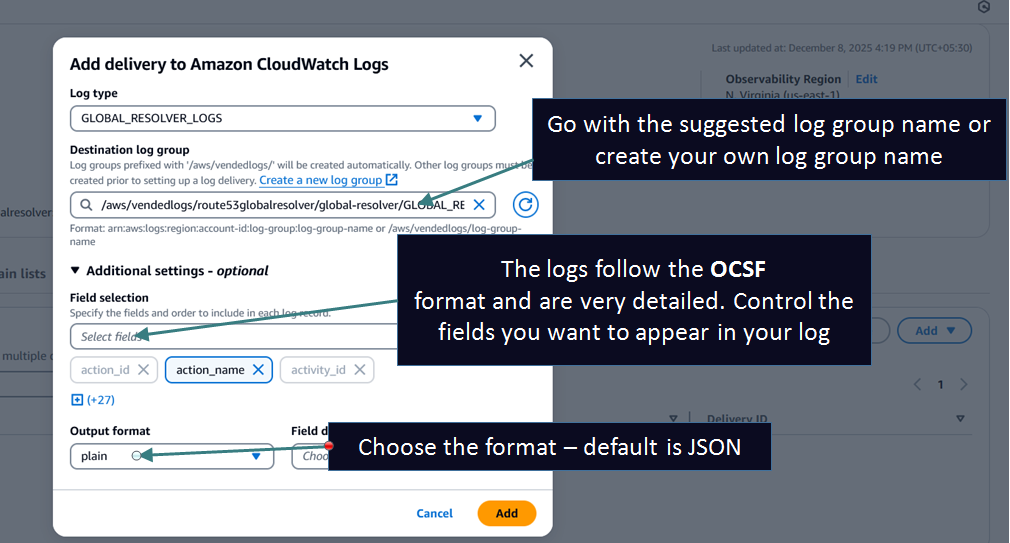
Example setup to send logs to CloudWatch Logs:
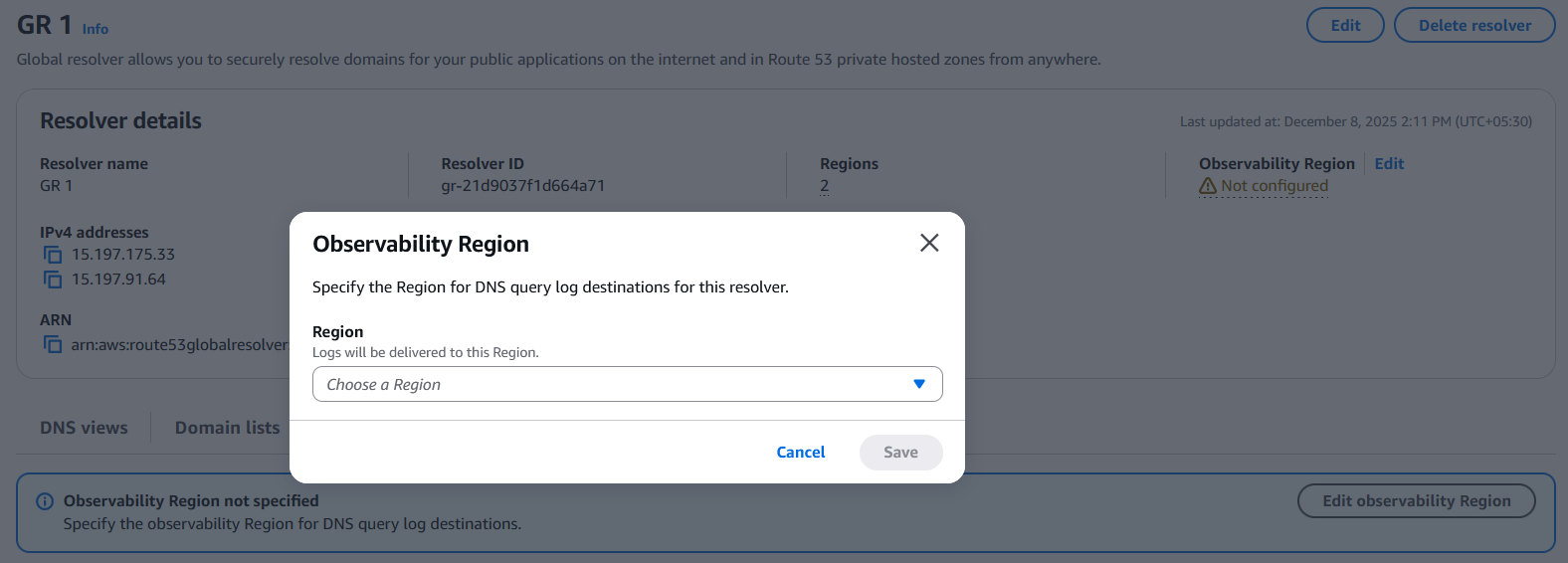
1. Set the observability region to specify the region where the logs will be sent:
2. Set the logging parameters:
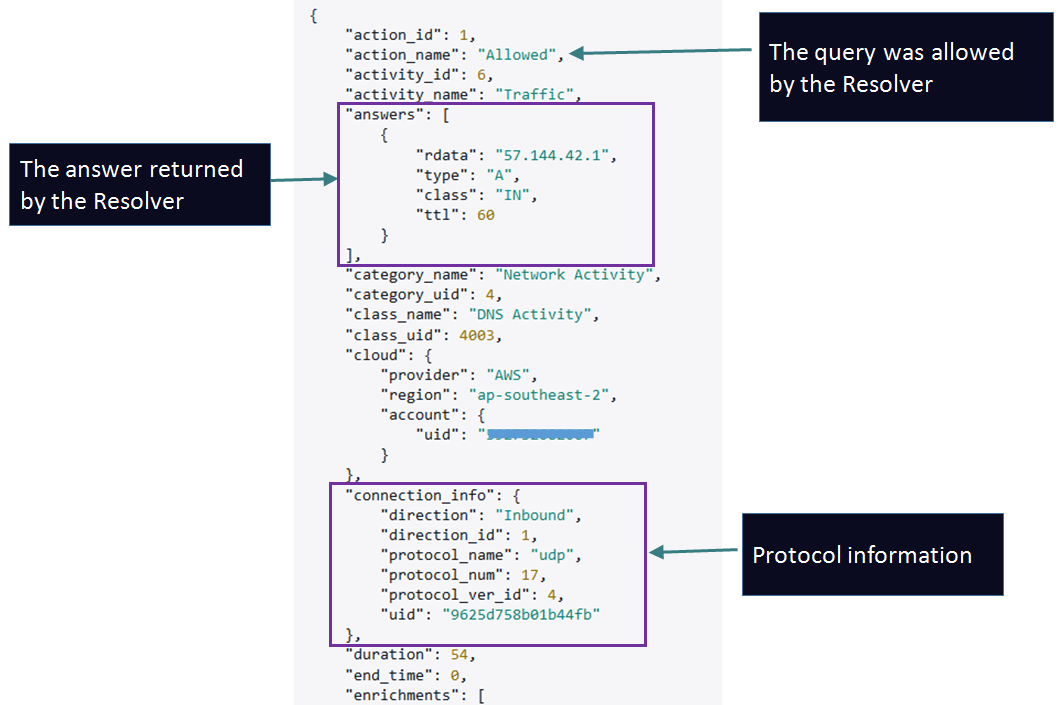
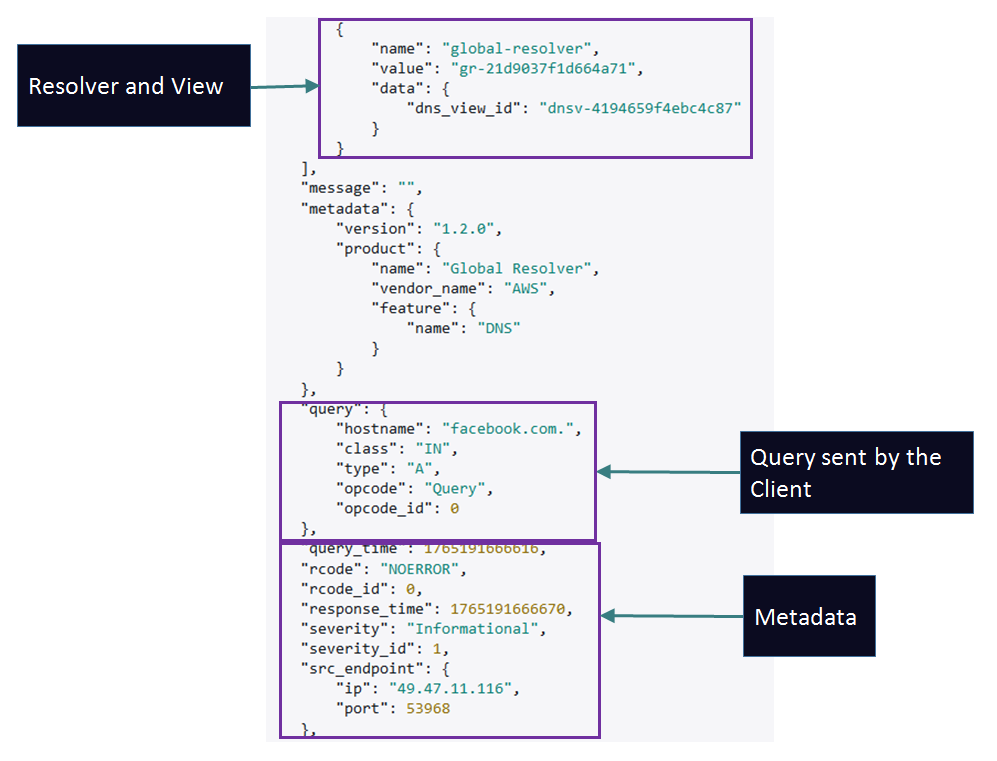
Sample Log:

Example:
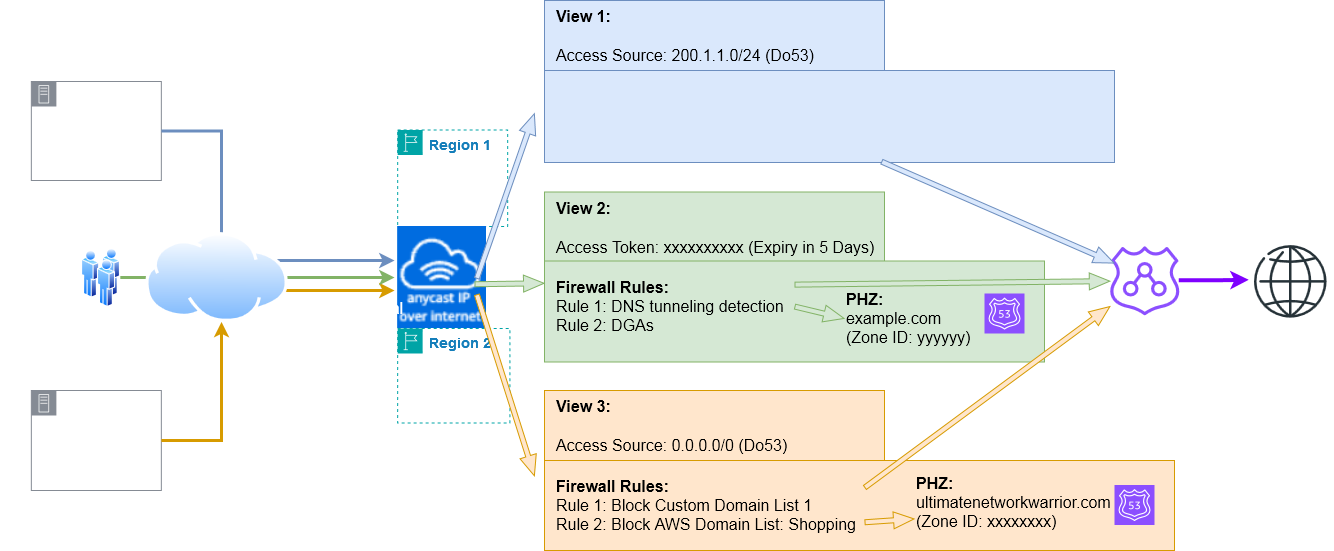
Scenario #1: Here clients from 200.1.1.0/24 using regular DNS over TCP/UDP will match View 1 where there is no Firewall Rules or PHZ associated. As such they will be able to query all public domain names. The resolver will query public Name Servers and provide recursive resolver services to these clients. The view settings like DNSSEC validation and ECS will apply.
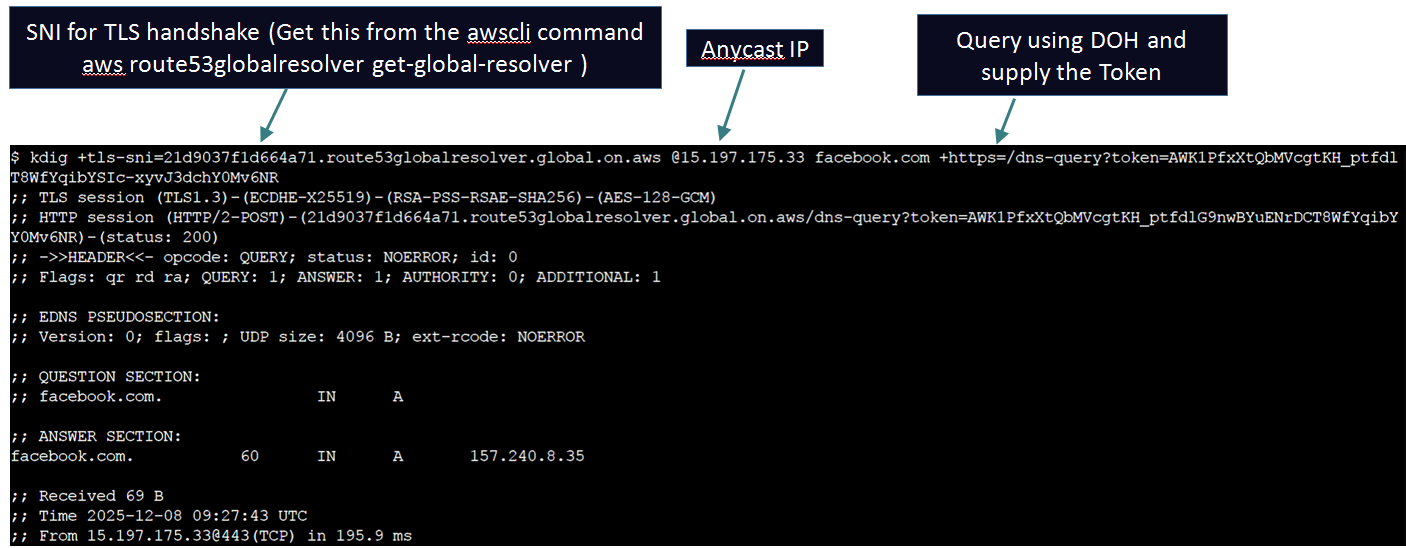
Scenario #2: Any mobile client with any IP address can match View 2 as long as they query using DoH or DoT and present an unexpired matching token in the query. Their query will be subjected to the Firewall rules and if the query is allowed then it will be allowed to proceed. If the query matched the associated PHZ namespace then the PHZ will be used to answer the query. If not the resolver will query public Name Servers to try and resolve the query for the clients. Example of a client querying using Access Token:
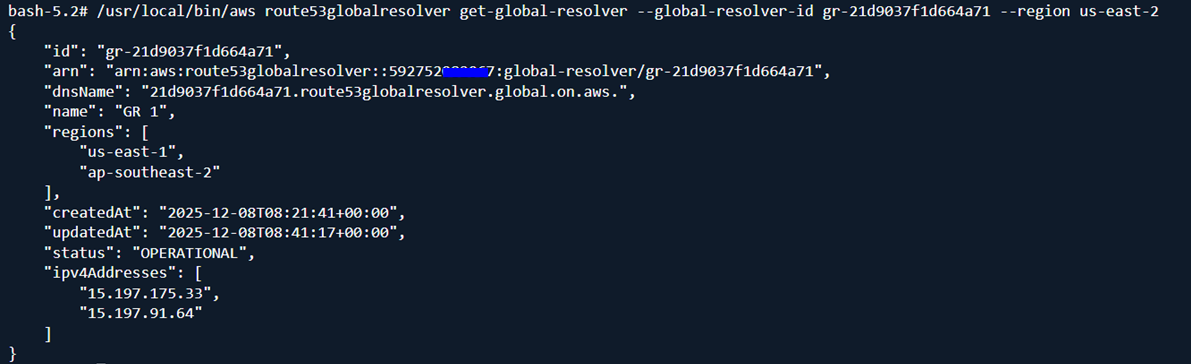
Use this command to get the DNS name for your Anycast IPs. This is required when sending queries using DoH and DoT. Make sure to set the region to us-east-2 and use the latest AWS CLI version:
Use tools like kdig to query over DoH or DoT. Normal dig appears not to be compatible with Global Resolver at this point of time because of TLS version mismatch - but otherwise the query will look pretty much the same with dig as well:
Scenario #3: All other IPs except 200.1.1.0/24 and using Do53 can match View 3 (This can be very dangerous - you are letting the world query your Resolver and you will be charged for all these queries). Make sure to define only authorized IP ranges.
Example query getting blocked because of Firewall rules.
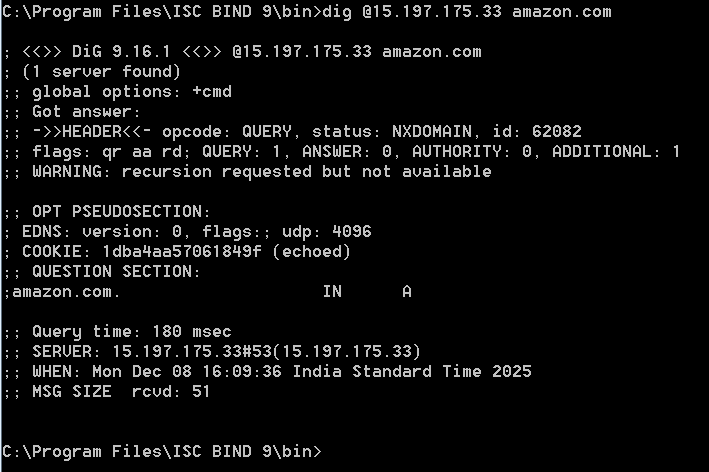
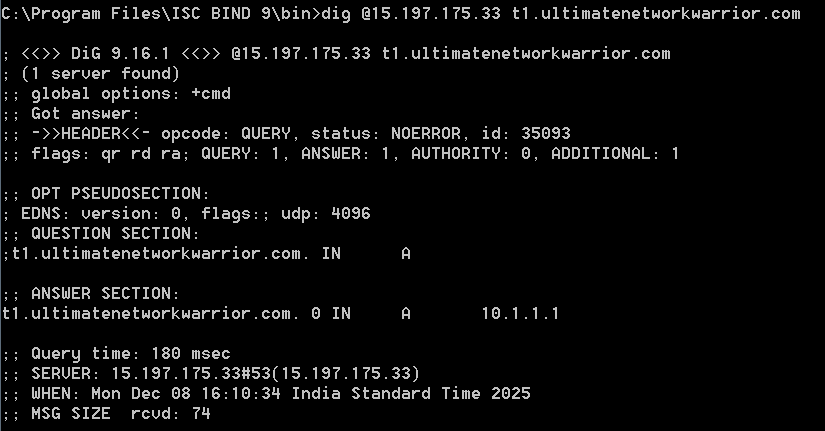
Example query matching PHZ ultimatenetworkwarrior.com
Example query returning NXDOMAIN because there was no record found in the PHZ. The resolution does not fall back to the public hosted zone which actually has a record for this domain name.
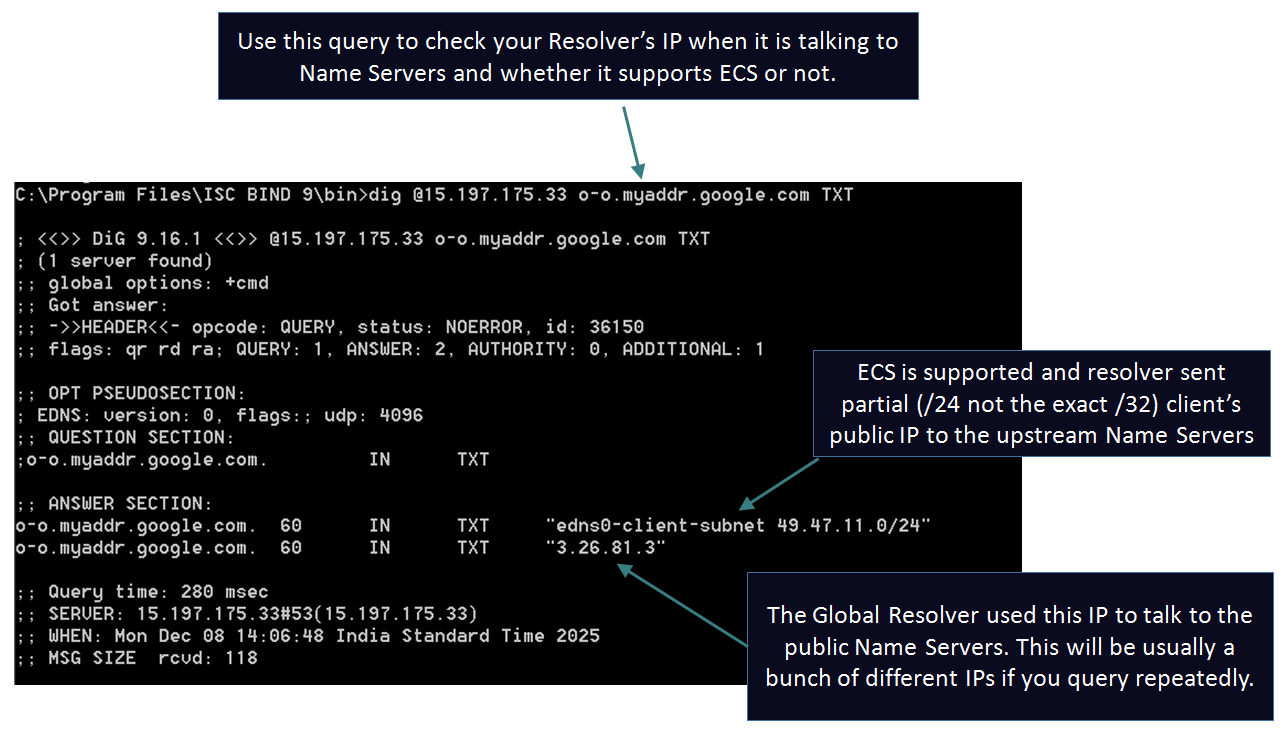
Example query showing the ECS functionality:
The feature is now live. The management plane for this service is us-east-2. You can launch the Resolver from the following regions (minimum 2 required): US East (N. Virginia), US East (Ohio), US West (N. California), US West (Oregon), Europe (Frankfurt), Europe (Ireland), Europe (London), Asia Pacific (Mumbai), Asia Pacific (Singapore), Asia Pacific (Tokyo), Asia Pacific (Sydney). Don't forget to check out Quotas related to this service before you start planning to use it.