
Nuts and Bolts of AWS Application Load Balancer (ALB) Scaling
Dec 19, 2025ALB is one of the types of Elastic Load Balancing (ELB) products from AWS. It's a well known Layer 7 Load Balancer used by 1000s of customers.
In this article I will show why AWS calls it "Elastic" Load Balancing. In general when they add Elastic to a product it refers to the ability of a system or service to automatically expand and contract capacity based on demand. This lets you dynamically add more capacity when needed and release it when it’s no longer needed, helping optimize performance and cost.
ALB achieves this by something known as Scaling. The ALB scales up when the request volume goes up and scales down when the volume falls down. The ALB scaling is based not only on request volume but also on other dimensions such as bandwidth, connection rate, concurrency, and the expense of any additional processing needed for features you are using such as Amazon WAF or Amazon Lambda. This is all done automatically by the service based on the volume of requests. Because of this scaling feature the ALB can handle a very large volume of concurrent requests running into millions of requests per second which is enough for majority of the applications without any manual effort. This is different from Auto Scaling Groups (ASGs) which is another AWS service designed to handle dynamic scaling for a group of EC2 instances placed in a Target Group attached to your ALB. ASGs help with dynamically scaling the resources hosting your application while the ALB scaling features helps with scaling the capacity of the ALB itself.
In very few cases customers need even higher capacity and there are other advanced techniques to achieve that requirement - you can read more about that topic in this blog.
The best part is that the service has been designed to minimize interruption to client traffic when the scaling process takes place. When the traffic volume increases linearly or in other words at a steady pace at some point the ALB will scale up to accommodate the higher request volume but it will do so in such a way that it is completely seamless to clients without any service disruptions or request failures as long as the client follows the TTL in the DNS record and does a lookup when the TTL expires before making further requests. However if there is a very large and a very sudden surge or spike in traffic some clients may face request failures for a minute or two until the scaling process completes. In other words the scaling process will not be completely seamless.
Lets take a closer look at the scaling process. The below diagram shows that the ALB is made up of nodes which are represented as ENIs which you can see in your EC2 console. Just choose Network Interfaces from the left hand menu in the EC2 console and filter using the name of your ALB to see the current set of ENIs. Each node has its own IP address which is returned when the ALB DNS name which is provided by the service is looked up. This DNS record has a fixed TTL of 60 seconds. The ALB creates a node in each AZ you associate to the ALB. In this example I have assumed that AZ A and B were selected while creating the ALB.
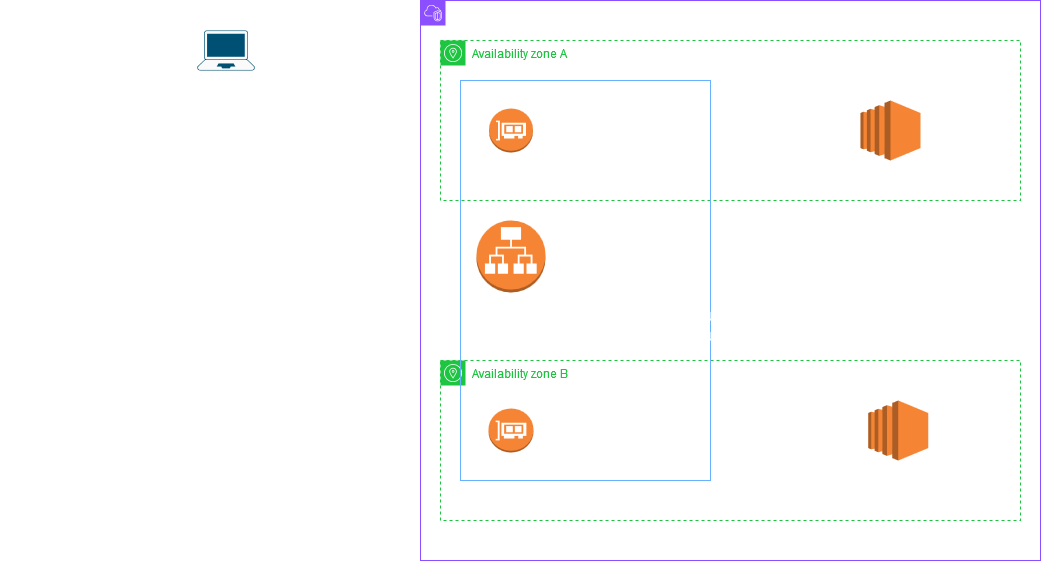
The example also shows how an ideal client should behave with respect to the TTL of the DNS record. The key point to note is that if the client needs to make a new connection after the TTL has expired it should do a fresh DNS lookup and use the IPs returned in the new lookup. This is really important for ALB scaling to be seamless because as part of the scaling process the ALB IPs change.
The below diagram shows the scaling process which got triggered when the load on the ALB increases more or less proportionately:
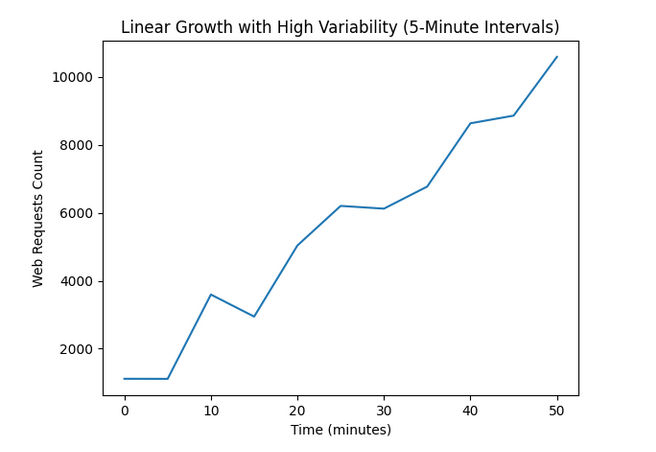
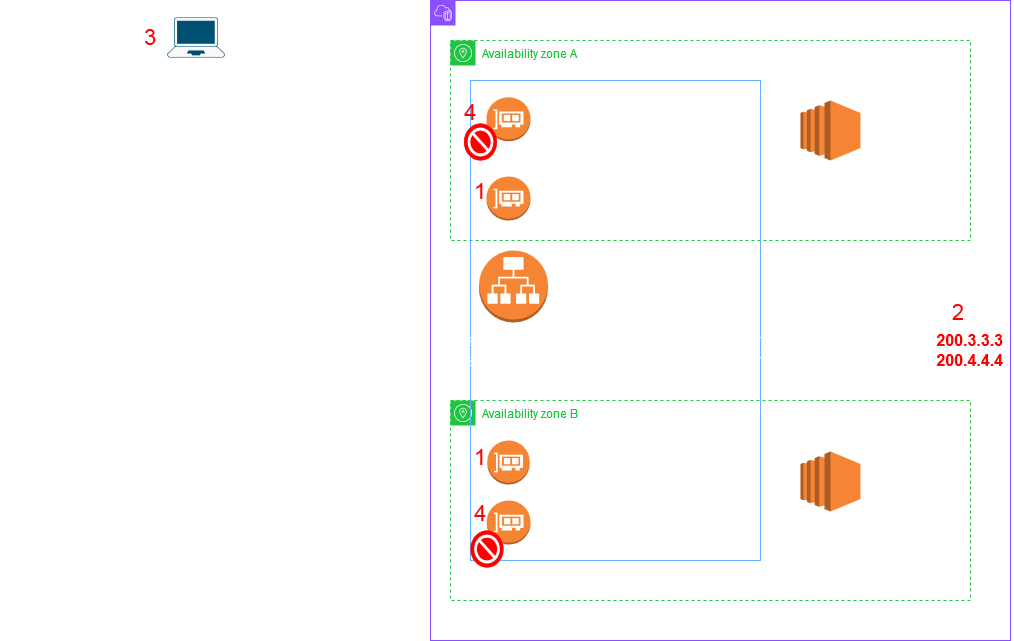
This scale up process can repeat multiple times if the traffic volume keeps on increasing. The below paragraph is from AWS documentation and it explains the rate at which your traffic can grow before it can overwhelm the ALB nodes. If the traffic keeps growing at this rate the scaling process at each step will remain seamless to clients provided they follow DNS TTL best practices.
"You can expect your ALB to scale up to support doubling your workload in five minutes. For example, an ALB handling one Gbps of traffic can be increased to two Gbps within five minutes, then to four Gbps in the next five minutes, and so on. This also applies for other dimensions of your traffic, such as the rate of new connections, and the total number of concurrent connections."
The initial few scale up steps will replace nodes with more powerful nodes - this is known as "scale up". However if even more capacity is needed then the service starts to "scale out" - this means that the service will start creating multiple nodes in each AZ to handle the traffic volume - this can be several nodes per AZ. The DNS name of the ALB will resolve randomly to a maximum of 8 nodes IPs to provide a DNS load balancing effect so that the traffic is spread effectively to all nodes - more on this after this diagram which shows the scale out process:
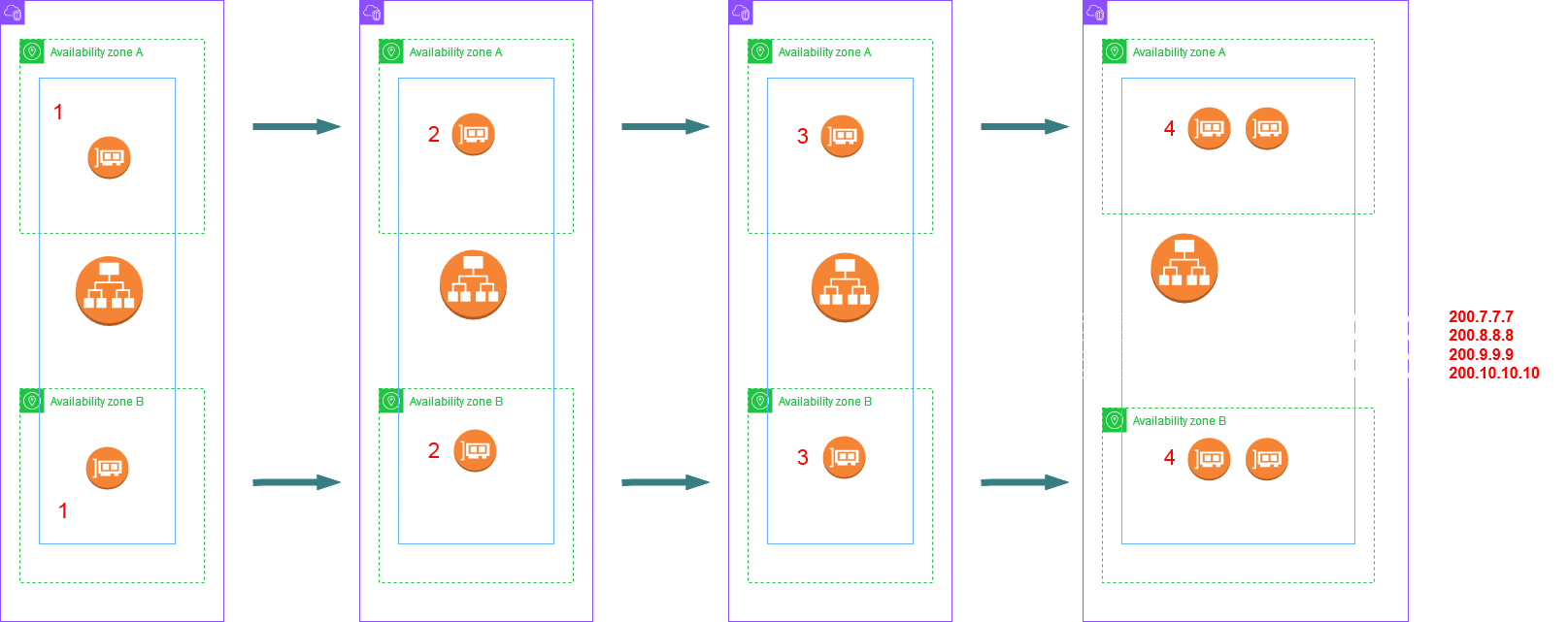
In the above diagram the scale out process just begun with the service creating an extra node in each AZ - Given 2 AZs the ALB now is made up of four nodes. The DNS name will resolve to all 4 IPs. If the traffic increases further the scale out process can add even more nodes in each AZ. If the nodes go beyond 8 in total then the ALB DNS name returns a random set of 8 IPs on each lookup. This ensures to spread the load to all nodes. The below diagram shows this:
This way clients will get a different set of IPs on each lookup thus spreading the load to each node.
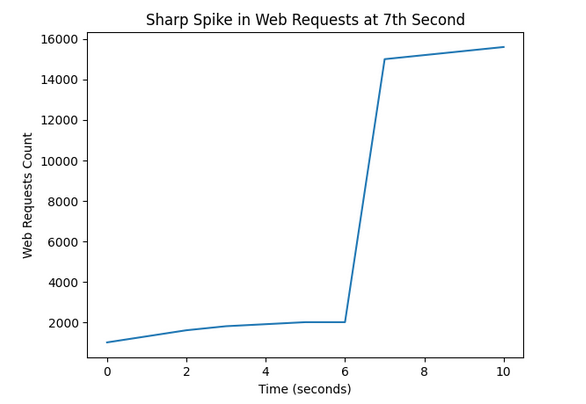
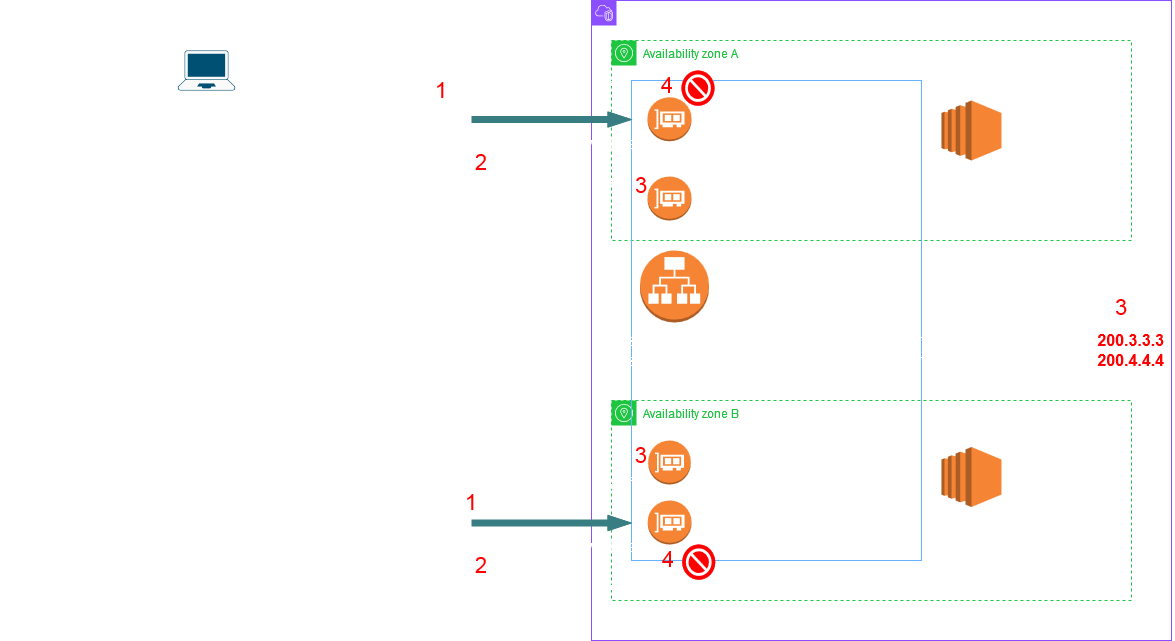
However if the load increases dramatically - like a sudden sharp spike of requests then it may result in request failures since it could overwhelm the current ALB nodes while the new ones are being created. The failures should not last for a long time since the client if following the TTL would make fresh DNS lookups and then eventually connect to the new more powerful nodes. The below picture shows the sequence of events.
Once the volume of traffic falls below a certain threshold and the service determines that this volume can be handled by less nodes or less powerful nodes it may "scale in" our "scale down" respectively. The service scales up/out aggressively however it scales down/in conservatively i.e it wont start scaling down/in as soon as the traffic volume drops. The scaling down/in process is similar. In case of scale in some nodes IPs are removed from the DNS record. They are still kept in service for a safe period until connections drain off them and then the nodes are discarded. For scale down, first new less powerful nodes are created and added to DNS, next the existing ones are removed from DNS and then discarded after few hours/day when the connections have drained off.
Now there is a way to avoid those request failures even when there is a sharp spike in traffic. The service recently launched a feature called Capacity Reservation. Well even before this got launched you could request AWS support to do this for you on your behalf. However they have now built this control right at your fingertips in the console. This feature allows you to reserve a minimum capacity for your ALB using what is known as Load balancer Capacity Units (LCUs). In other words you are requesting for more powerful nodes in advance so that they can handle the spike without failing. This is extremely useful if you have an upcoming event and you are expecting a sharp spike in traffic or you naturally have an unpredictable spiky traffic pattern and you need as close to 100% uptime.
I am currently writing another article on how Capacity Reservation works. Until then I hope you enjoyed reading this article! Thank you for visiting and let me know if you have any questions in the Comments section.