
AWS Application Load Balaner (ALB) - Connection Handling
Dec 18, 2025AWS ALB like any other Load Balancing network device is essentially a Reverse HTTP proxy which means that it works at Layer 7 of the OSI model and fully understands the HTTP traffic which is passing through it. At the TCP level its acts like a full TCP proxy.
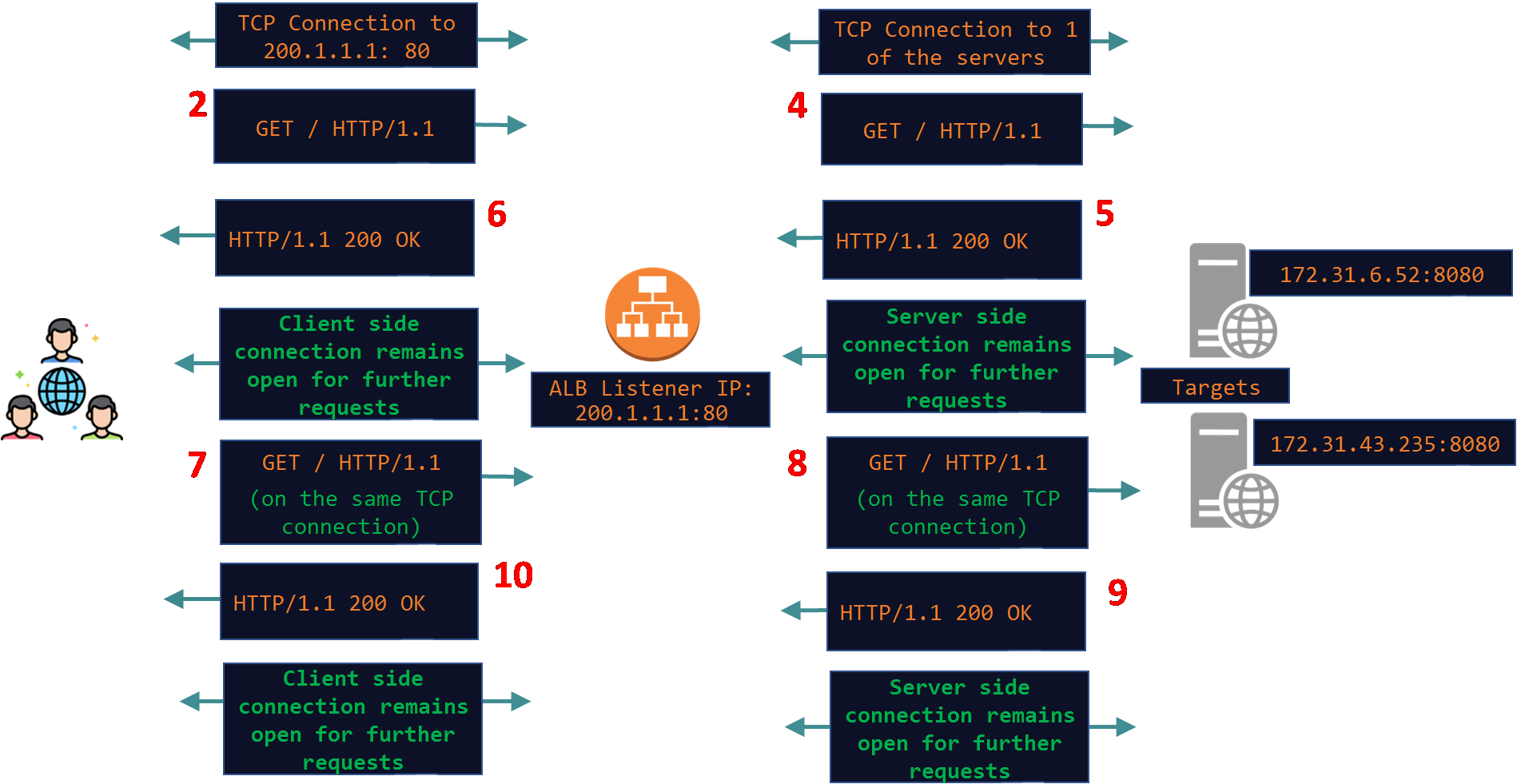
Clients connect to the ALBs IP - this is the front-end or client side TCP connection and send their HTTP request. The ALB then creates a new TCP connection with one of the targets - this is the back-end or server side TCP connection and then proxies the HTTP request to the target. When it receives a reply from the target it copies the reply onto the client side TCP connection. The story does not end here - we need to talk about connection closure too. TCP connection closure is the source of many networking issues if not handled correctly by the client and the server software. It can get worse especially if there is a full TCP proxy device in the path and if various timers on all three - client, proxy device and the server are not configured correctly. Continuing with the traffic flow, after the 1st HTTP request is complete, both of these connections may or may not remain open for more requests. This depends on how HTTP Keep-Alive (aka Persistent Connections) and various other timeout settings are configured on the client, ALB and the targets. In this article I will practically show examples of how the ALB manages both of these TCP connections under various scenarios when things work smoothly and also a few scenarios when client or target close connections abruptly.
Here is a simple diagram depicting a basic request/response exchange between the client and the target through the ALB. In this example I am assuming that Keep-Alive is not supported on the client and the target. This is indicated by the Client in the HTTP Request and by the server in the HTTP reply using the Connection Header set to the value of Close. This means that the connections should close as soon as the HTTP request has been answered by the server. If the client wants to send another HTTP request it will need to happen on a new TCP connection.
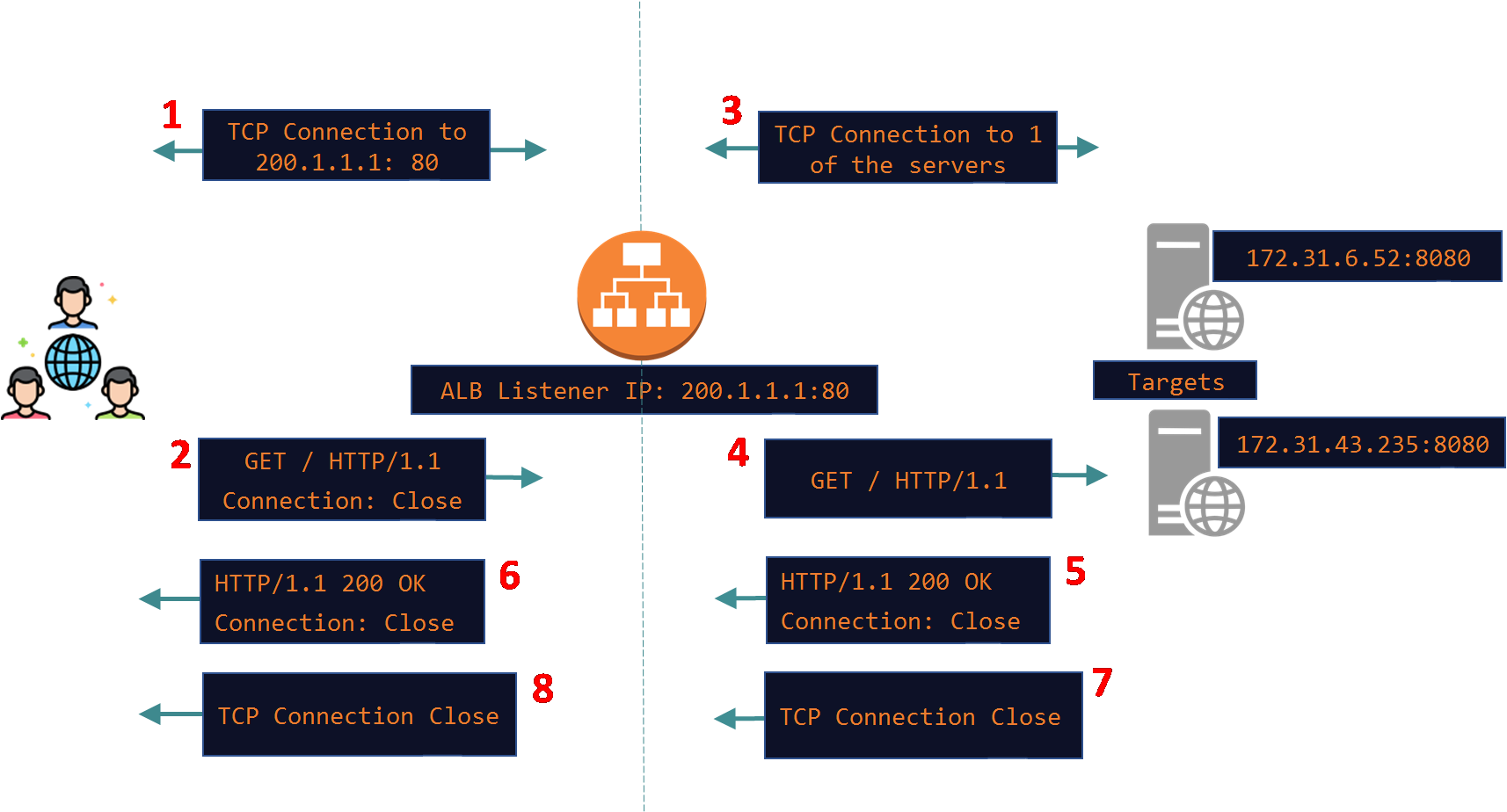
Note that the exchange took place over HTTP/1.1. According to the original RFC 2068 and the current ones: 9110 and 9112, HTTP/1.1 defaults to Persistent Connections i.e all HTTP/1.1 connections are Keep-Alive connection even if the "Connection: Keep-Alive" header is not added explicitly. In other words even if the "Connection: Keep-Alive" header is missing all HTTP/1.1 connections are assumed to be Keep-Alive connections and they will be left open for future HTTP requests.
The below example simulates this scenario where both client and target do not support HTTP Keep-Alive. I made the below request using Curl and explicitly added the Connection header set to the value of Close:
# curl 13.238.85.105 -v -H "Connection: Close"* Trying 13.238.85.105:80...* Connected to 13.238.85.105 (13.238.85.105) port 80* using HTTP/1.x> GET / HTTP/1.1> Host: 13.238.85.105> User-Agent: curl/8.11.1> Accept: */*> Connection: Close <--- We explicitly told Curl to add this header in the request. >* Request completely sent off< HTTP/1.1 200 OK< Date: Sun, 14 Dec 2025 10:36:21 GMT< Content-Type: text/html< Content-Length: 10< Connection: close <--- This was sent by the ALB. The one sent by the target was consumed by the ALB on the server side and it then added a new one to honor the clients Connection header. See explanation below.< Server: Apache/2.4.58 (Ubuntu)< Last-Modified: Thu, 11 Dec 2025 12:35:16 GMT< ETag: "a-645ac60879b52"< Accept-Ranges: bytes
Here is a pcap taken on the ALB nodes. I used AWS VPC Traffic Mirroring feature to capture traffic on the ALB ENIs.
Client: 13.239.55.8213.239.55.8213.239.55.823.27.212.193 / ALB IP: 13.238.85.105 (Internal IP: 172.31.12.172) / Targets: 172.31.6.52
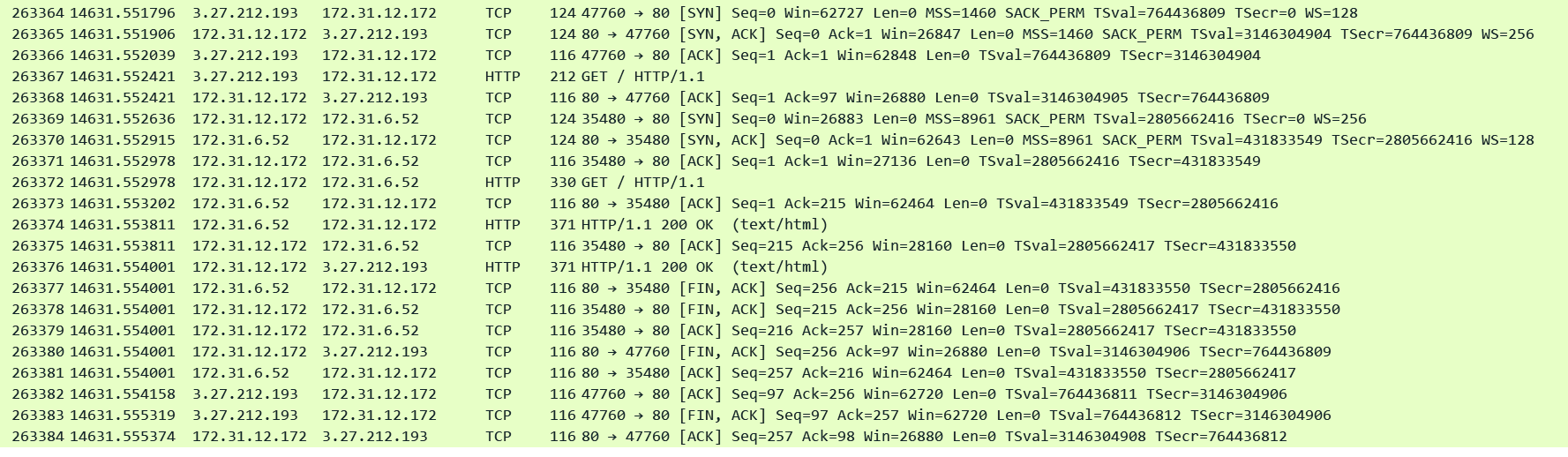
Note that the target immediately closes the connection after sending the 200 OK reply in pkt#26377 and the ALB also immediately closes the client side connection.
Now the eagle eye amongst you would have noticed that when the ALB proxied the HTTP request to the target it removed the Connection Header. This is perfectly compliant with the RFC. The RFC states that the Connection header is a per hop HTTP header - it is meant to be consumed by any intermediate HTTP device in the path between the client and the server. The ALB which an RFC compliant HTTP proxy consumes it and honors it on the Client side connection by adding the Connection: Close header while passing the reply towards the client and also by closing the TCP connection. However it is upto the intermediate HTTP device whether to add the Connection header or not while proxying the request to the next HTTP device in the path. The ALB has been designed to use Keep-Alive connections on both the client and the server side and therefore it simply does not add the Connection header at all (remember if this header is absent it means that it is assumed to be a Keep-Alive connection). However in this example Keep-Alive setting is disabled on the Target. Therefore the target adds the "Connection: Close" header and closes the server side TCP connection with the ALB. The ALB consumes this Connection header and understands that the target wishes to close the connection and to honor the Clients Connection header it adds a new one with the value set to Close.
What this tells us is that both connections are independent of each other - One side can close when the request/response cycle is complete while the other side can remain open - it just depends on how the client and the target are configured - the ALB assumes all HTTP/1.1 requests and replies to be Persistent Connections unless the client or the server explicitly want to close the connection. In this next example I have enabled Keep-Alive on the server and this is the result:
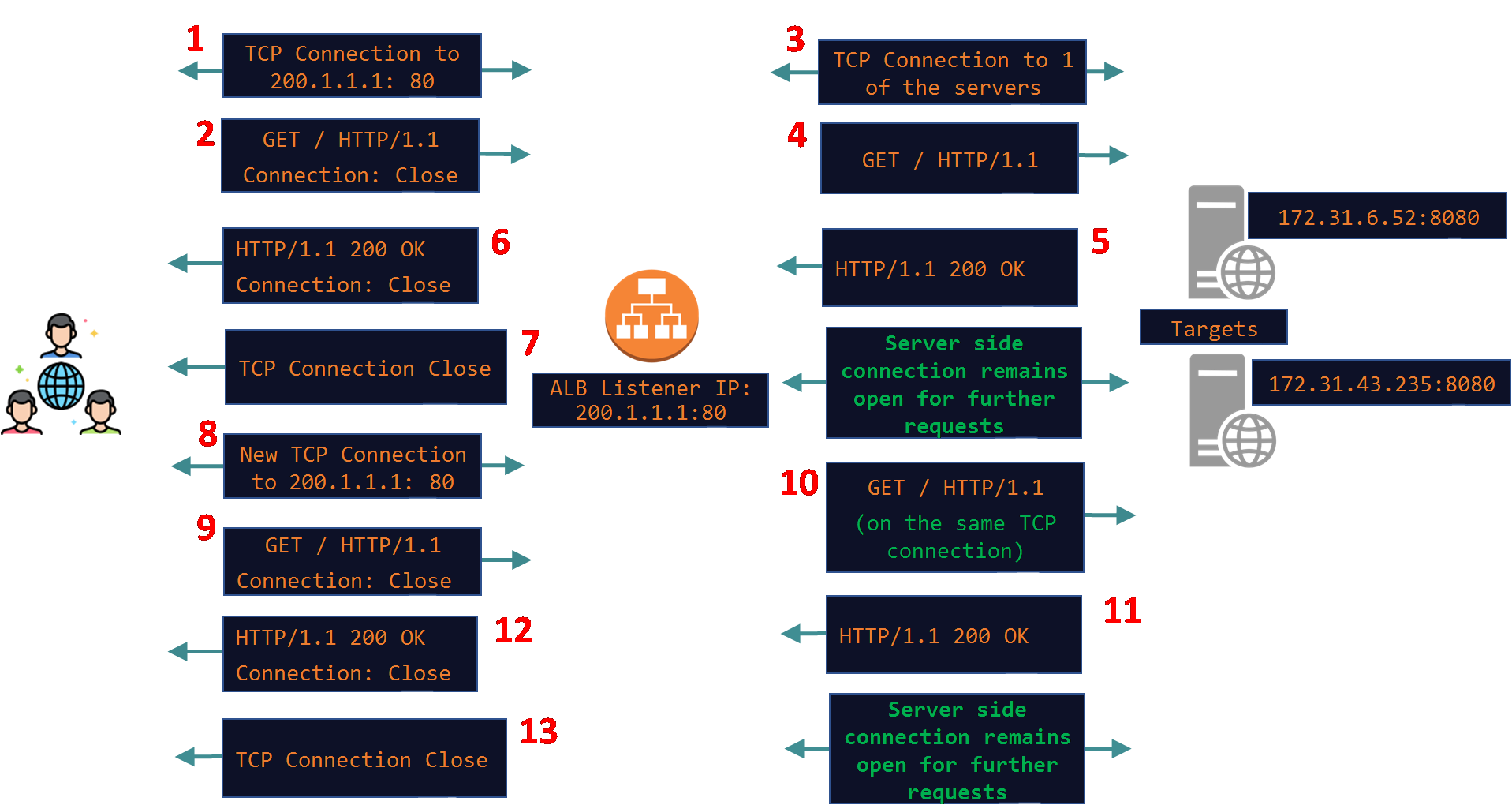
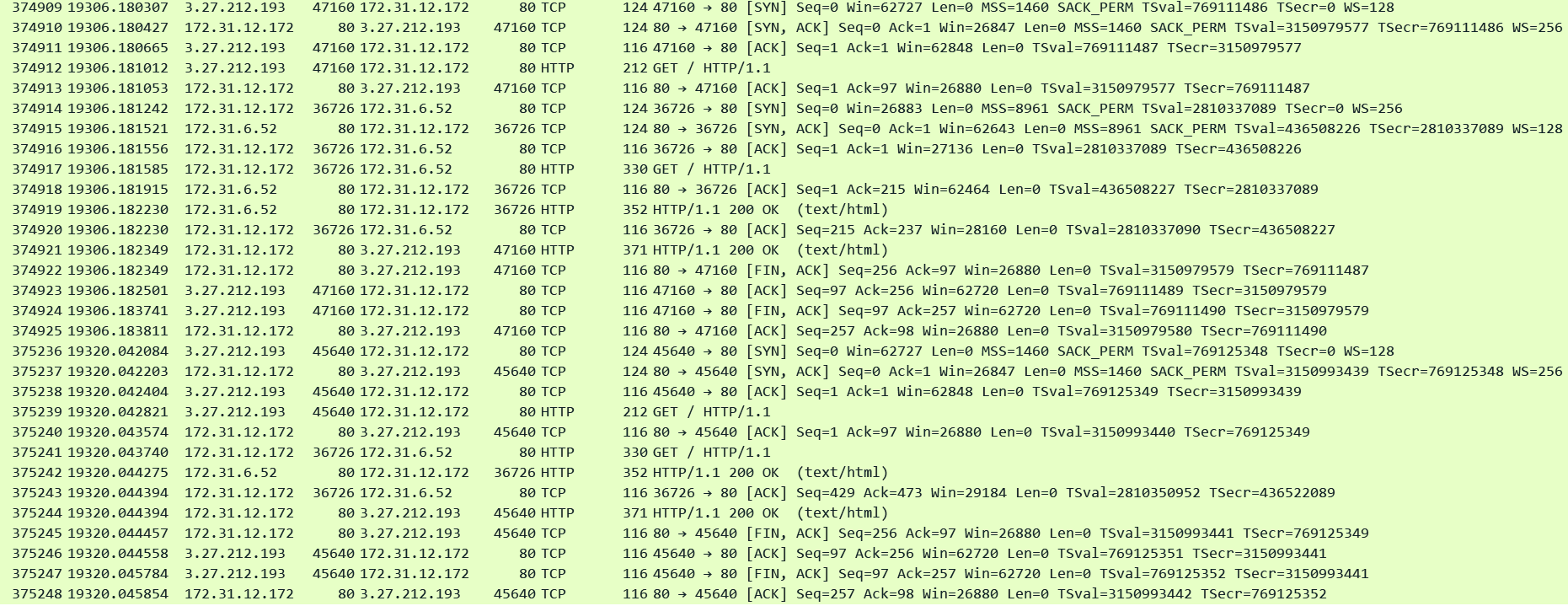
In the below pcap note that the server side connection on port 36726 remains open after the 1st HTTP request has been answered by the target in packet#374921. But the client side connection was closed since I again used Curl to send a Connection: Close header. After a few seconds a new request arrives from the client on top of a new client side connection but this request was proxied to the target using the same server side connection on port 36726 in pkt#375241.
The opposite will happen if the client supports Keep-Alive but the target does not. The ALB will honor the Keep-Alive connection on the client side and the connection will remain open for future requests but the server side connection will be closed by the target immediately after serving the response.
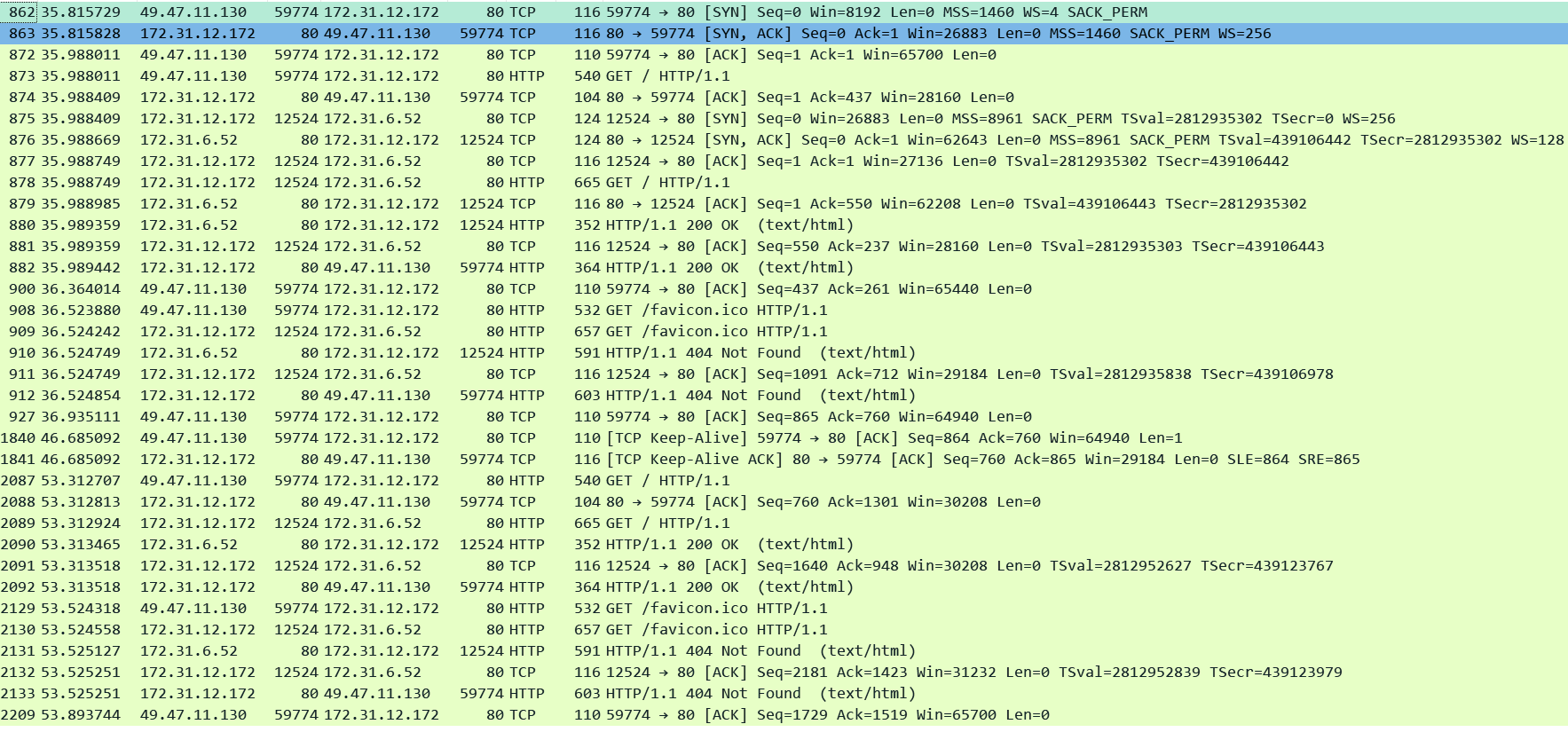
In the next example I am using a browser to send a request to the ALB. All browsers usually support Keep-Alive connections. The targets are also enabled for Keep-Alive. The result is that both connections remain open and can be re-used for future requests:
The below pcap shows that the both the client and server side connections remained open after the 1st exchange of request/response. The new request from the client (49.47.11.130) which came after a few seconds in packet#2087 came over the same client TCP connection (port 59774) and was dispatched towards the target on the same server side connection (port 12524) in pkt#2089.
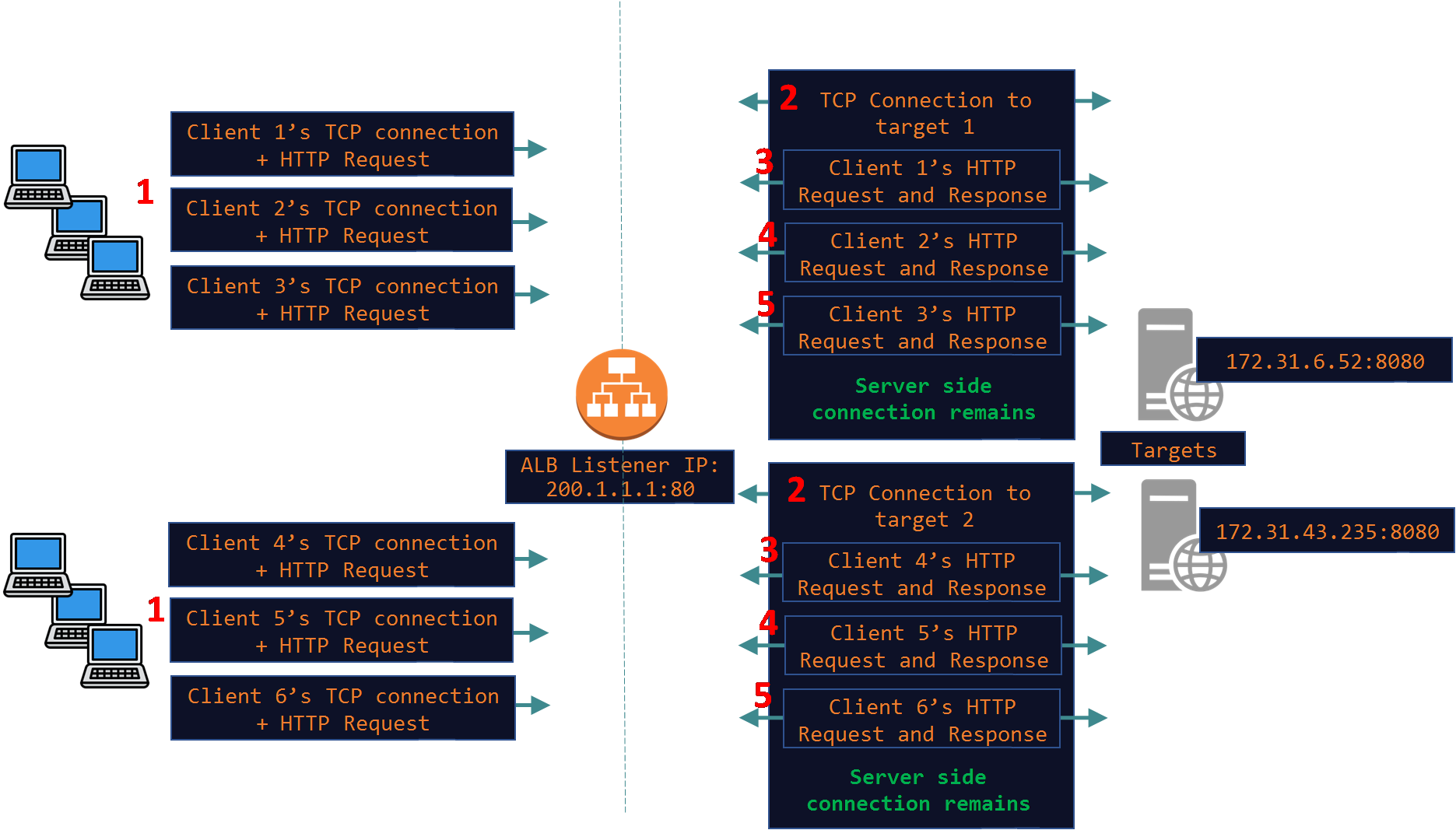
Below is a very common scenario where the ALB is receiving requests from 100s and 1000s of clients and it proxies those requests over a small number of TCP connections opened with every target. This is also known as TCP or HTTP Multiplexing where a single or few connections to a target are used to proxy hundreds and thousands of client requests. This saves the overhead of opening and closing 100s and 1000s of TCP connections on the server side. By reusing the same TCP connection both the ALB and the targets conserve resource like CPU, Memory and Bandwidth.
Idle Timeouts:
The next thing to understand is that for how long a Keep-Alive connection can be left open and who closes the connections. This depends on how the various timeout settings are defined on each of the players in the game - the client, the ALB and the targets. Lets first explore the server side and then the client side.
Server Side:
On the target it depends on the web server/application that is running on the target like Apache/Nginx/Tomcat/Nodejs etc. No matter what the software may be they will usually have a few timeout settings. The relevant ones to our discussion are:
Initial data timeout: After a client establishes a TCP connection with the target, how long the target will wait for any HTTP request. If no request is received within that time limit the target server will close the connection.
Keep-Alive Timeout: This one is very important for our discussion when Keep-Alive setting is enabled on the target as this controls for how long the target will wait for the next request on an idle Keep-Alive connection. If the connection is idle until this time expires then the target will close the TCP connection. However if it does receive another request then the timer resets. The below pcap demonstrates this behavior. I have set this Keep-Alive timeout to 10 seconds on my target.
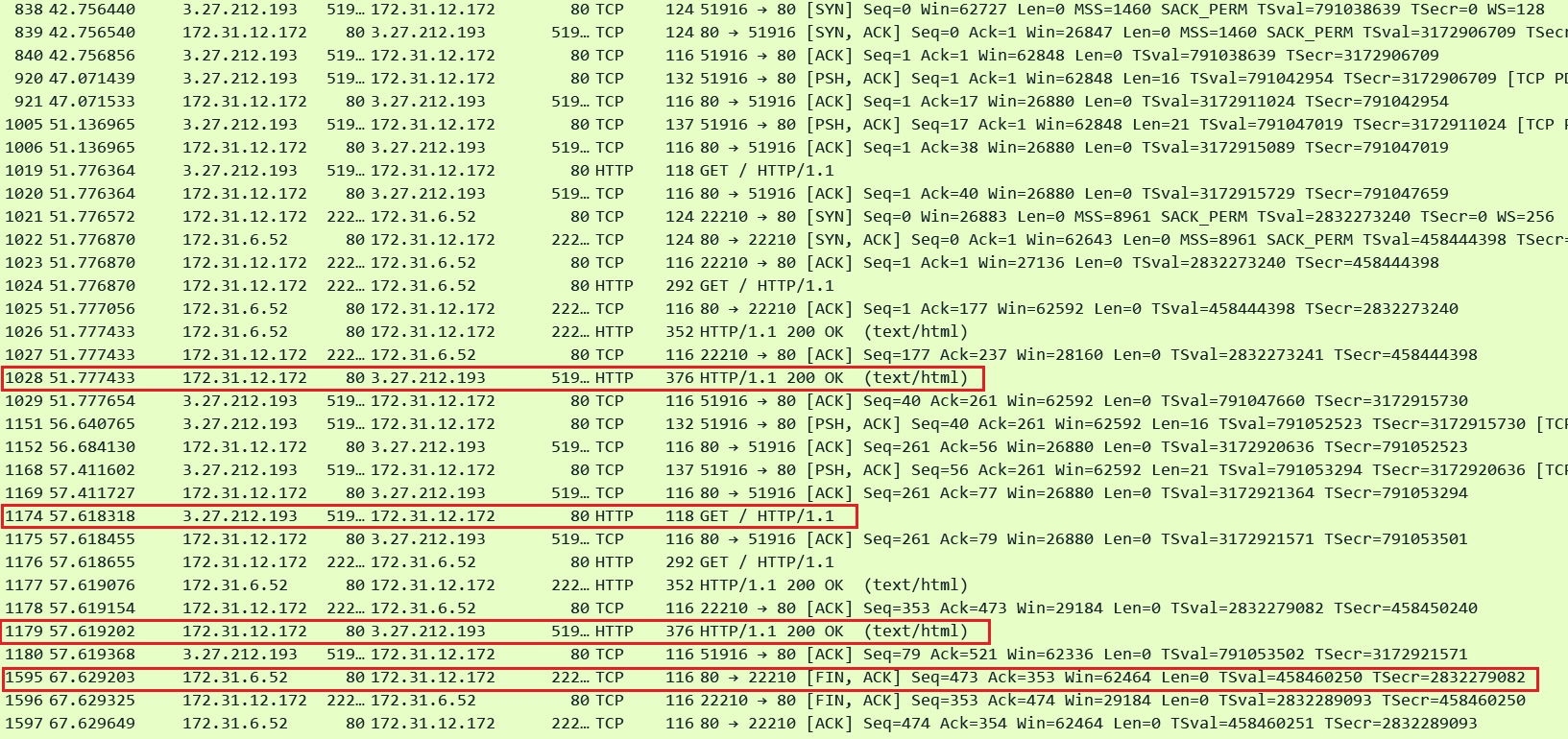
Packet#1028 - The 1st request completes.
Packet#1174 - Another request arrives after ~6 seconds - it is dispatched to the target over the same existing TCP connection (port 22210). The Keep-Alive timer is reset.
Packet#1179 - Reply is sent to the client marking the completion of the 2nd request.
Packet#1595 - Target initiates connection closure exactly 10 seconds after the previous reply was sent out in Packet#1177.
Now lets add the ALBs timeouts settings into the mix. The ALB has 2 timeout settings. The important one is Connection Idle Timeout and the default for this is 60 seconds.
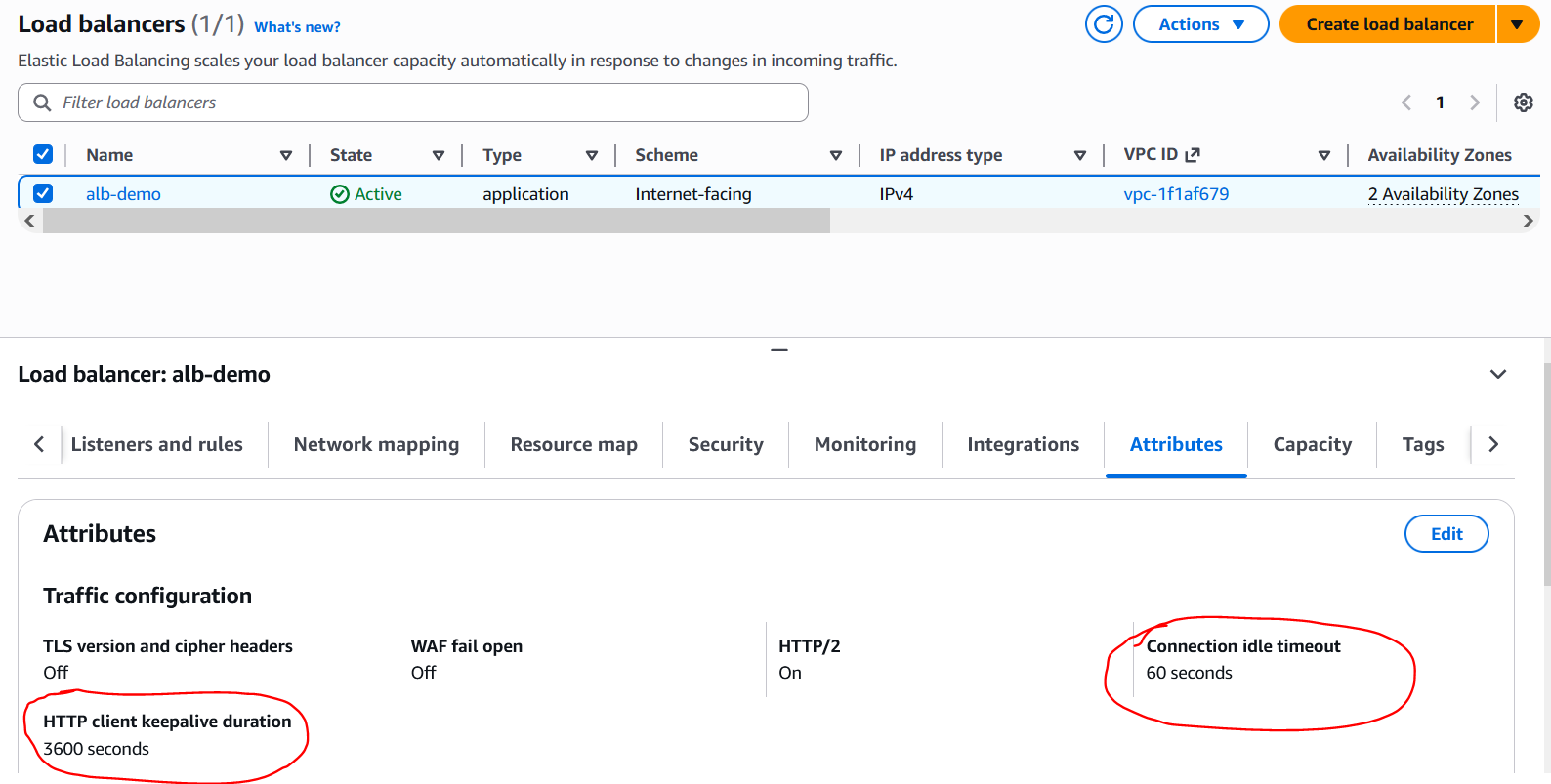
This setting controls for how long a client or server side Keep-Alive connection can remain idle. If a connection remains idle and this time expires the ALB will close that connection. So now we have the ALBs idle timeout and the targets Keep-Alive timeout - whichever timer expires first that side will initiate the connection closure. For this next demonstration I set the ALB idle timeout to 5 seconds while my target timeout is still set to 10 seconds.
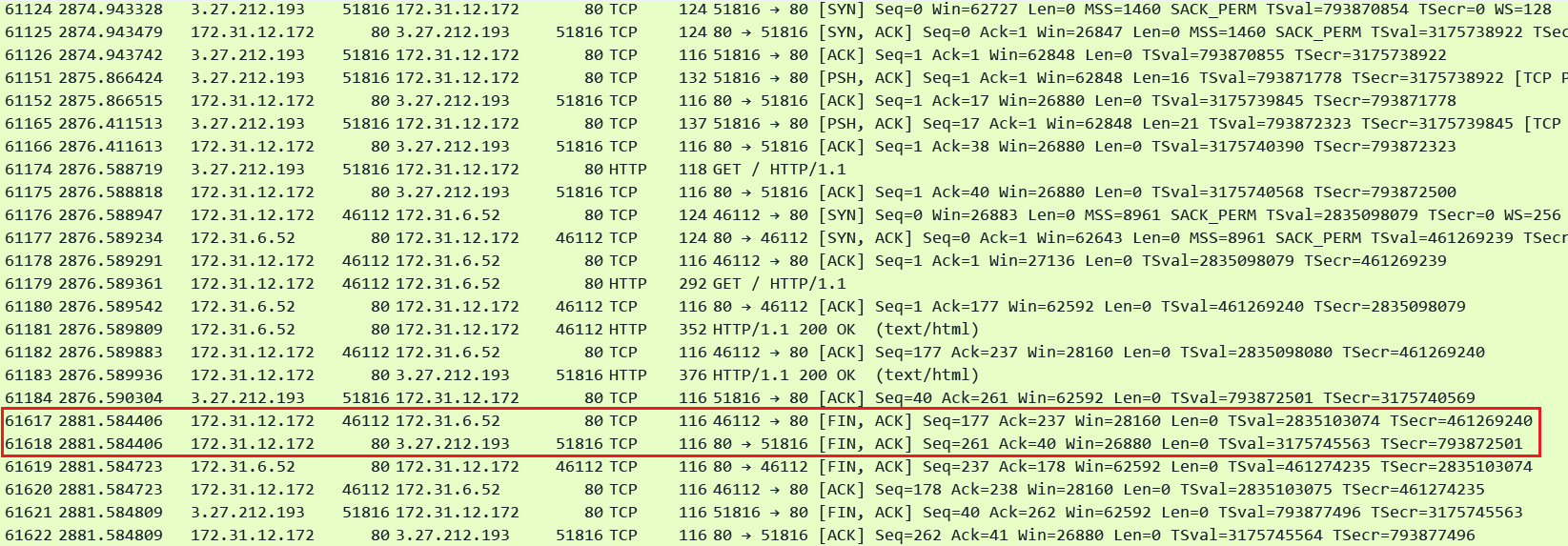
In this pcap we can see that the ALB initiated connection closure in both directions exactly after 5 seconds of the last activity on both the connections.
As you can imagine if these timeouts are not set appropriately on the ALB and the target it can lead to issues like clients receiving HTTP errors. Lets explore a few error scenarios:
1. ALB idle timeout expires before target replies:
Client: 13.239.55.82 / ALB: 172.31.12.11 / Target: 172.31.6.52
In this scenario the ALB has sent a request to the target and is waiting for a reply but in the meantime the ALB idle timeout expires. In this case the ALB will close the connection with the target and generate an HTTP 504 error to the client.
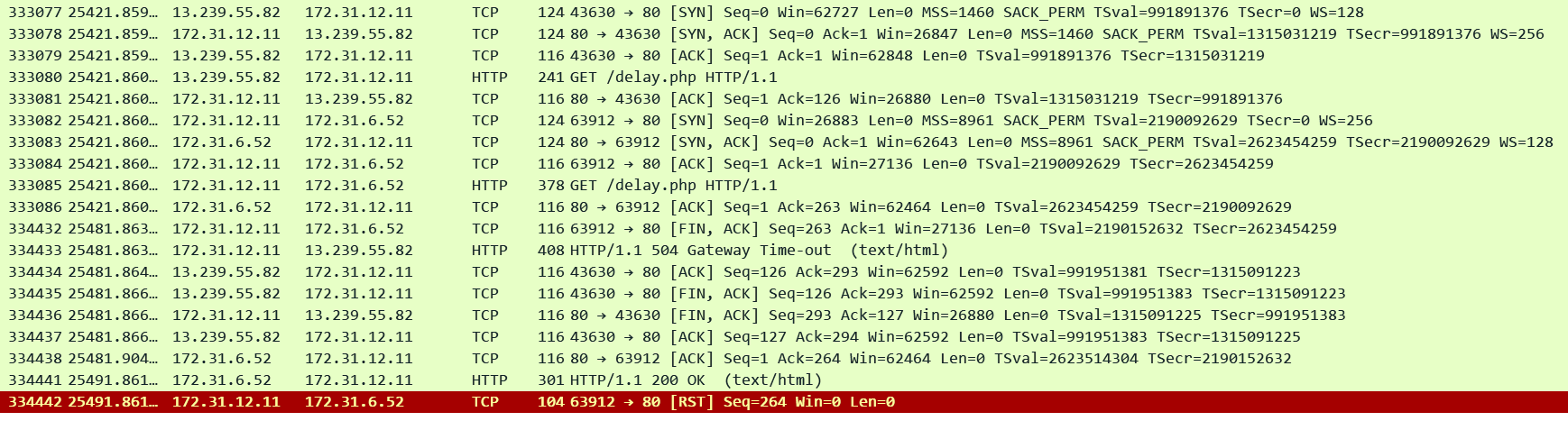
We can see that the ALB sent a request to the target in pkt#333085 at timestamp: 25421.860. Since there was no reply from the target the ALB timed out exactly after 60 seconds in pkt#334432 (timestamp = 25481.863) closing the connection with the target and then generating the 504 error to the client.
2. Target timeout expires before it can reply to the clients request:
Client: 13.211.35.216 / ALB: 172.31.1.158 / Target: 172.31.6.52
In this scenario the ALB has sent a request to the target and is waiting for a reply but in the meantime the target timeout expires. Note that on some web servers/application the Keep-Alive timer does not count when the target is processing a request. It only starts counting when there are no outstanding requests to be answered on the connection and the connection is sitting idle waiting for the next request from the client. However there are other usual timers on web servers/applications like max script execution time which control for how long the script/program can execute once a request has been received. If this timer expires before the target can fulfill the client request it can cause the target to respond back with an HTTP error or even a TCP FIN/RST. In case the ALB receives an HTTP error it will pass it as it is to the client. But if it receives a FIN/RST then it generates an HTTP 502 error to the client as demonstrated next.

We can see that the ALB sent a request to the target in pkt#195905 at timestamp: 9688.184. After 11 seconds in pkt#196125 the target sends a FIN to the ALB thus causing the ALB to generate a 502 error to the client.
The general recommendation is that the script execution/related timers, the ALB idle timeout and the Keep-Alive timeout on the target should be set to accommodate the longest running requests.
The second recommendation is to set the Keep-Alive timeout on the target slightly higher than the ALB's idle timeout. For example if the idle timeout on the ALB is set to 60 seconds then set the Keep-Alive on the target to 61 or 62 seconds. This will ensure to avoid race conditions where the ALB sends a new request on an idle connection just as the target initiates the closure of the connection. By setting a higher timeout on the target we are ensuring that the ALB can always send requests and safely close idle connections without creating any conflicts.

In the above pcap we can see that the ALB received a new request from the client and it started to send the request on an idle server side connection and at the exact same time the targets Keep-Alive connection expired and it started to close the connection with a FIN. This resulted in an HTTP 502 error for the client.
TCP Keep-Alives
Another thing to note is the effect of TCP Keep-Alives on the ALB's idle timeout and the targets Keep-Alive timeout. Both of these timeouts are HTTP Keep-Alive timeouts which means that they only get reset when there is an actual HTTP message on the connection. A mere TCP Keep-Alive packet which does not carry any HTTP data will not reset these timers.
Below I am making a connection straight to the target bypassing the ALB from a Windows machine (172.31.12.156) using Chrome browser which sends TCP Keep-Alives every 45 seconds. Most browsers will do this automatically although the Keep-Alive intervals will differ for example Firefox sends every 10 seconds.
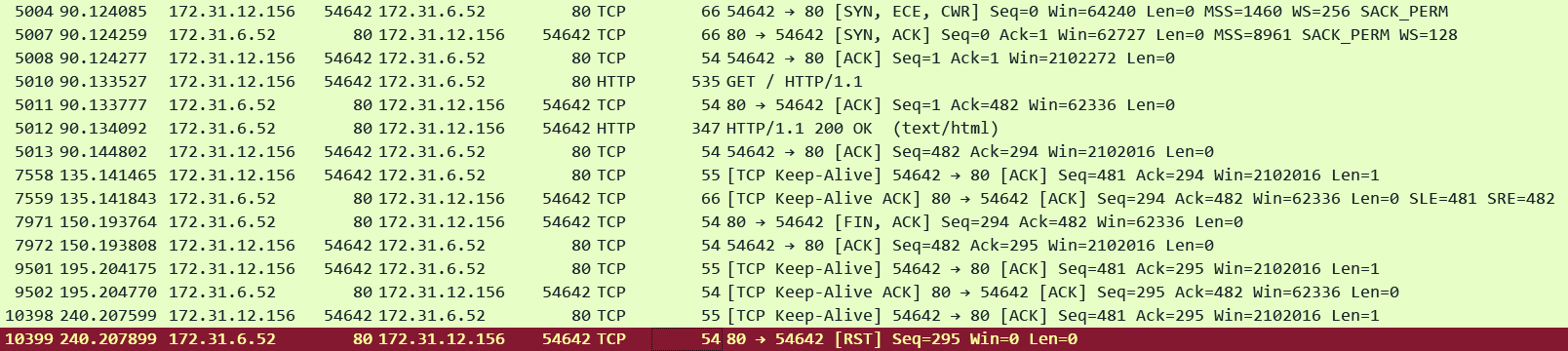
In the pcap we can see that the client did send a TCP Keep-Alive at the 45 second mark. However the target which is configured with a 60 second Keep-Alive timeout ignored the TCP Keep-Alive packet and tried to close the connection with a FIN exactly 60 seconds after the last HTTP data packet (pkt#7971)
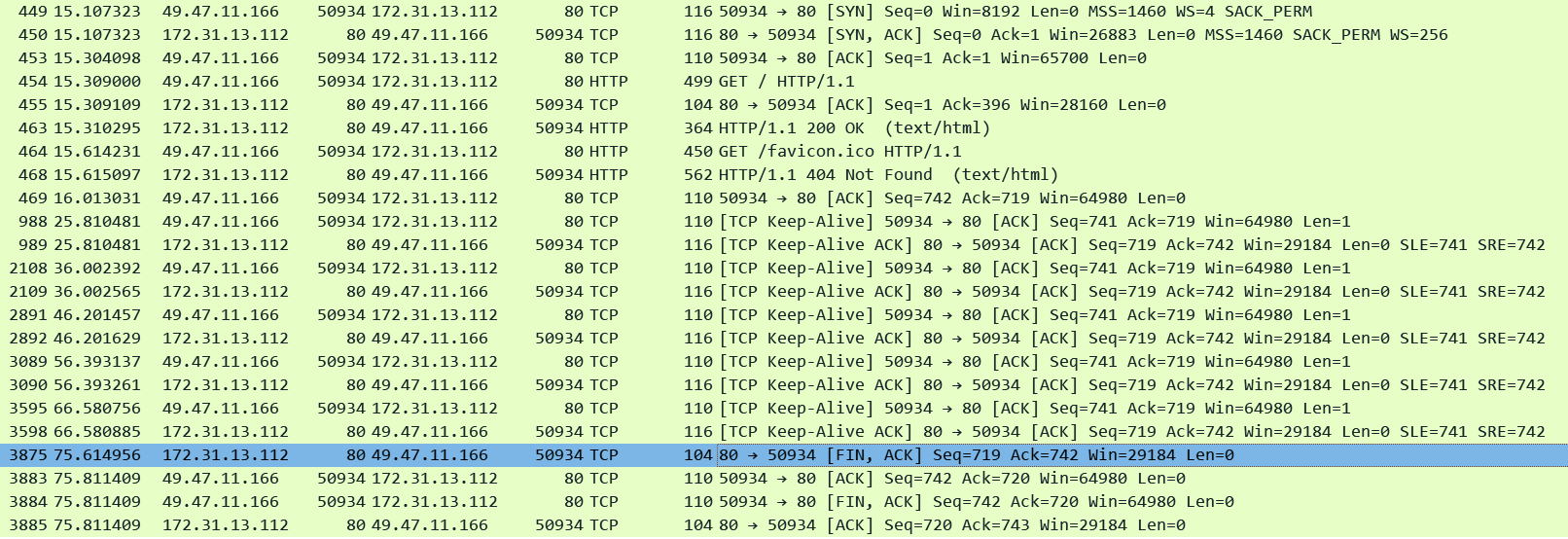
Similarly I made a connection to the ALB using Firebox browser. We can again see similar behavior. The ALB is configured with a 60 second idle timeout and it ignored the TCP Keep-Alive packets and tried to close the connection exactly 60 seconds (pkt#3875) after the last HTTP data packet which was in pkt#468
Client Side:
Alright now lets explore how timeouts work on the client side. We have the ALBs idle timeout which also applies to client side idle connections as well and it does not reset with TCP Keep-Alive packets. We saw how this works on the client side as well in one of the pcaps above.
There is another timeout setting on the ALB called HTTP client keepalive duration as per the screenshot above with a default value of 3600 seconds. This one controls for how long a client side Keep-Alive connection can last. It does not get reset when a new request is made by the client on the connection. It just defines the total length of a client side connection. A client side Keep-Alive connection cannot go beyond this time limit. When this timer expires the ALB will entertain 1 more request on that connection and then close it.
In this below lab I set the ALB idle timeout to 300 seconds and the HTTP client keepalive duration to 60 seconds. I just captured the Client side connection (Client IP is 54.206.98.238, ALB is 172.31.13.112)
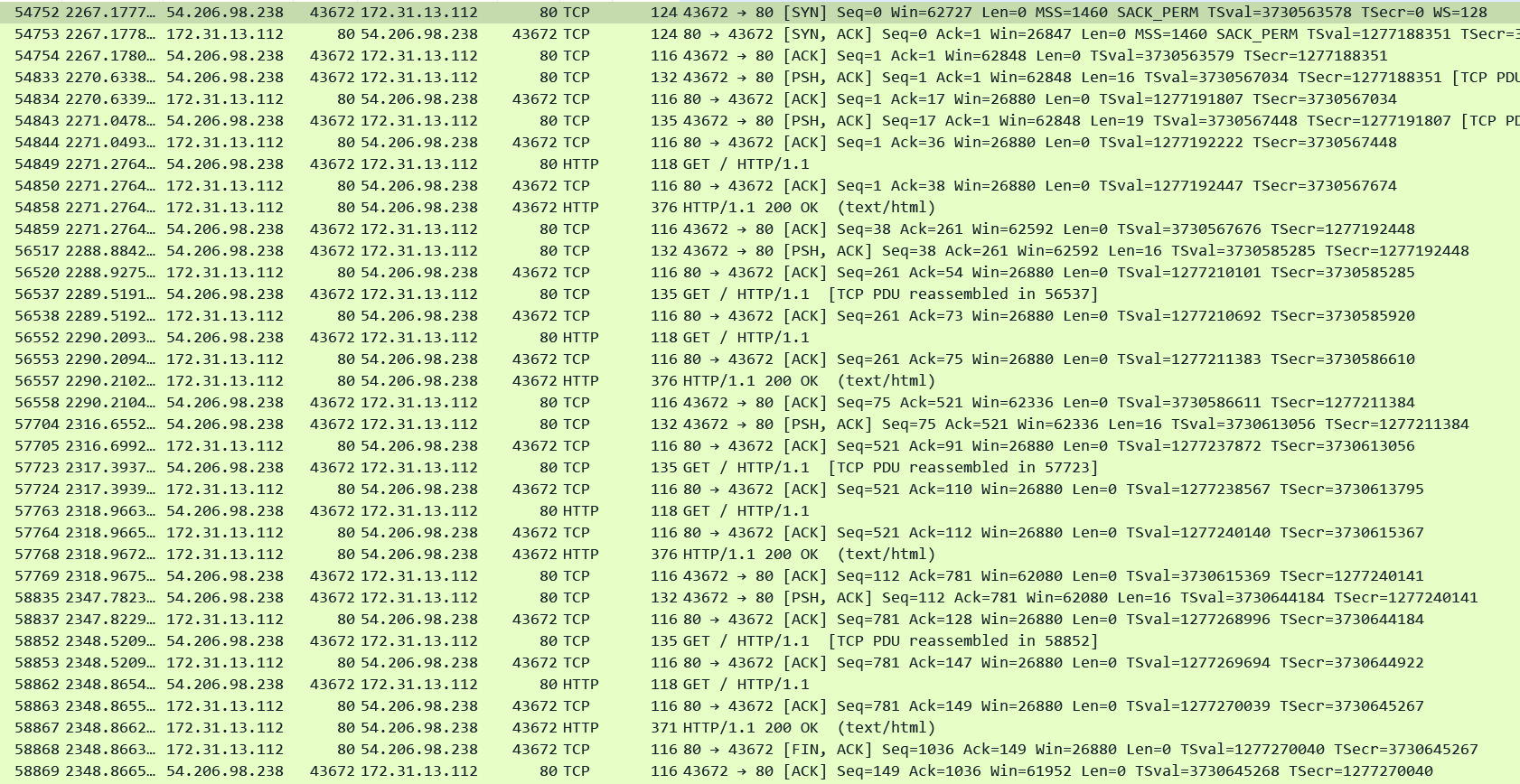
In the pcap we can see that the client was sending requests frequently over the connection - anyways it does not matter since idle timeout is much higher i.e. 300 seconds - the connection could have remained idle too. The key point is that after 60 seconds of the connection being established when the client sent another request in pkt#58862 (81 seconds after the connection got established and 21 seconds after the HTTP client keepalive duration expired) the ALB entertained it and then closed the connection gracefully.
Now coming to timeouts defined on the client. This can be very different from client to client. For example a browser, curl and Postman as HTTP clients have very different behaviors. Apart from these there are a bunch of HTTP packages/libraries/plugins that assist programs in making HTTP requests - every programming language has their own set of libraries for example a popular library for Python is Requests. But no matter what the client is there are the usual timers:
Initial connection timeout: Controls how long the client will wait to establish a connection with the server.
Response timeout: Controls how much time client will wait for the response.
Keep-Alive timeout: How long can a Keep-Alive connection remain idle.
Initial connection timeout is straightforward. For our discussion the last 2 are important. Lets take the browser and curl for example to put things into perspective on the client side. Firefox has a setting network.http.response.timeout which at this time of writing defaults to 300 seconds. Chrome also has similar timeout value although you can't adjust it on the latest versions. Curl does not has a default response timeout. It will wait indefinitely for a response once the request has been sent. The default ALB timeout is much shorter than this so you won't need to bother if your clients are any of these. However while using some HTTP library you need to ensure to set this timeout to accommodate for the longest running requests in your environment. The recommendation again is to set it to slightly more than the ALBs idle timeout. For example in the below example when I run the Python program it simply makes a GET request to the ALB and prints the response using the Requests HTTP library. In my program the timeout was set to 10 seconds - sample code:
import requestsdef make_get_request(url): """ Sends a GET request to the specified URL and prints the response. """ try: # Send a GET request to the URL response = requests.get(url, timeout=10) # Raise an exception for bad status codes (4XX or 5XX) response.raise_for_status() # Print the HTTP status code (e.g., 200 OK) print(f"Status Code: {response.status_code}\n") print("Response Content: ") print(response.text) except requests.exceptions.RequestException as e: # Handle any errors that occurred during the request print(f"An error occurred: {e}")webpage_url = "http://13.55.30.78/delay.php"make_get_request(webpage_url)
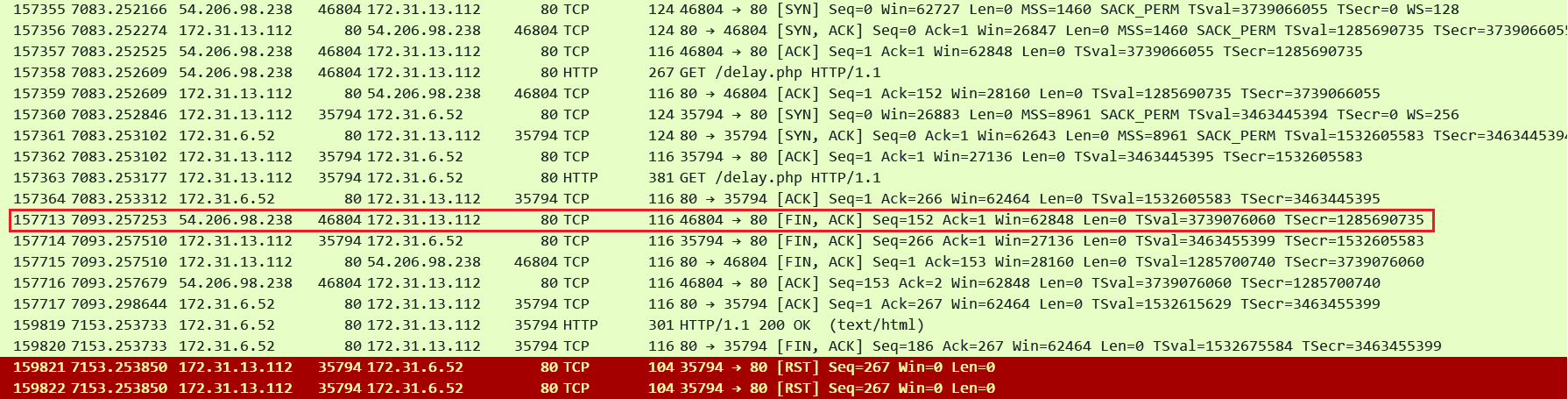
In the pcap we can see that the client closed the request 10 seconds after waiting for the reply. This appears as a HTTP 460 error in the ALB Access Logs even though the actual HTTP error was not sent to the client because anyways the client closed the connection. So the takeaway is that make sure to set the response timeout in your client carefully.
http 2025-12-15T17:17:48.637503Z app/alb-demo/1fa8b17e4c17e7c7 54.206.98.238:46804 172.31.6.52:80 0.000 -1 -1 460 - 151 0 "GET http://13.55.30.78:80/delay.php HTTP/1.1" "python-requests/2.25.1" - - arn:aws:elasticloadbalancing:ap-southeast-2:592752082067:targetgroup/alb-demo/e1419229e570d841 "Root=1-694042b2-2084024a481f9518671832f8" "-" "-" 0 2025-12-15T17:17:38.632000Z "forward" "-" "-" "172.31.6.52:80" "-" "-" "-" TID_306736828e35684f8cd83b9cc79a0b14 "-" "-" "-"
Regarding Keep-Alive timeouts modern browsers usually keep sending TCP KeepAlive packets and as long as the KeepAlive ACKs keep coming back they won't close the connection. Different browsers may have different limits on how many Keep-Alives they will send before they eventually close the connection. Curl on the other hand does not support Keep-Alive connections - it closes the connection as soon as the response is received. Therefore on the client side the HTTP Keep-Alive timeout is usually of no concern. The ALBs idle timeout pretty much controls when the connection will be closed if there is no HTTP activity on it.
Thanks for reading. If this saved you a few hours, it was worth writing! Subscribe to stay in touch!